
Flowkey Review 2026: Who It’s Good For and Where It Falls Short
Flowkey is strongest as a song-learning and guided sheet-music tool, but adult beginners should know where its feedback and curriculum stop.
Pract.is Editorial
Research-based practice guidance for musicians from the Pract.is editorial team.

Updated July 2026 — pricing and plans re-verified against Flowkey's official help center, store stats refreshed, and the verdict re-checked for 2026–27.
Flowkey is best understood as a guided song-learning app, not a full replacement for piano lessons. That distinction makes the app easier to judge fairly. If an adult wants to learn recognizable pieces with video, scrolling sheet music, Wait Mode, looping, slower tempos, and hand-separated practice, Flowkey is one of the stronger options. If the adult wants a complete path through technique, reading fluency, tone, rhythm independence, and musical interpretation, Flowkey needs support around it.
This review is based on Flowkey's current official product pages, App Store and Google Play listings, and subscription help pages, most recently re-verified in July 2026 (the pricing below was unchanged on that check). For the broader category, see our guide to piano learning apps for adults. Flowkey deserves its own review because it has a different feel from Simply Piano: less like a game-led course, more like a song and sheet-music practice environment.
Flowkey adult fit
8/10
for adults who want to learn songs from guided sheet music
5/10
as a complete substitute for a teacher or method plan
7/10
for motivated beginners who supplement technique and reading
The short verdict
Flowkey is a good choice for adults who are motivated by repertoire. Its official product page centers the app around thousands of songs, Wait Mode, video plus sheet music, slow motion, looping, and separate-hand practice. The App Store and Google Play listings describe songs in multiple difficulty levels, courses for reading music and playing with both hands, tutorials for scales, chords, and improvisation, and interactive feedback through microphone or Bluetooth/MIDI. That makes Flowkey especially useful for learners who already know that "I want to play this song" is more motivating than "I want to complete Unit 4."
The app's strongest feature is the way it combines visual information. A learner can watch a pianist's hands, follow the score, slow the music down, loop a short section, and practice each hand separately. For adults who freeze when looking at a normal page of notation, that is helpful. It gives the score context. It also makes fingering and hand movement less mysterious because the learner can see a model rather than only decode symbols.
The weakness is that this can become too comfortable. Watching the hands above the score can help a beginner start, but it can also delay real reading if the learner keeps relying on the video. Wait Mode can make practice less frustrating, but it can also reduce rhythmic accountability because the app waits for the right note instead of forcing the learner to keep time. Flowkey is useful, but it works best when the adult actively turns its supports down over time.
Official product page
flowkey.com
Shows the core workflow: songs, Wait Mode, video plus sheet music, slow motion, loops, and hand selection.
iPhone and iPad
App Store listing
Lists 4.7 stars from 60K+ ratings, plus in-app purchases and the song-learning feature set.
Android
Google Play listing
Lists 5M+ downloads, 4.5 stars, 42K+ reviews, Bluetooth/MIDI support, and practice modes.
Where Flowkey is genuinely strong
Flowkey's best use case is learning pieces in manageable sections. The official page highlights looping, reduced speed, Wait Mode, and separate-hand practice, which are exactly the tools most adults need when a song is just beyond their current level. Instead of playing from the top every time, the learner can isolate a few bars, slow them down, practice the left hand, practice the right hand, then put them together. That is much closer to useful practice than simply replaying a full song from the beginning.
The sheet-music presentation is another strength. Flowkey does not only present falling bars or a game-like lane. It puts video and notation on the same screen, and the App Store listing says tablet users can turn to portrait mode for a full sheet music view. That matters because many adults want to learn songs but also want to become less dependent on app-specific visual systems. Flowkey can act as a bridge if the learner looks at the notation first and treats the video as a helper, not the primary source of truth.
The app also fits adults who are not absolute beginners. Google Play describes tutorials for scales, chords, improvisation, and song arrangements across four difficulty levels. That gives returning players somewhere to go besides "Mary Had a Little Lamb" style beginner material. A returning adult who can already read a bit may find Flowkey more pleasant than a heavily gamified app because the reward is often a piece of music rather than a streak, badge, or cartoonish lesson sequence.
The Yamaha partnership is a practical bonus. Flowkey's Yamaha page says qualifying Yamaha digital piano or keyboard buyers in participating regions can receive three months of Flowkey Premium through March 31, 2027. That does not make Flowkey automatically the best app, but it changes the buying decision for many new keyboard owners. If the app is bundled with the instrument, an adult should use the trial period deliberately: test note recognition, try a few genres, compare tablet and laptop workflows, and decide whether the song library matches real taste before paying.
| Feature | Why adults like it | What to watch |
|---|---|---|
| Wait Mode | Reduces panic by waiting for the right notes | Can weaken steady rhythm if used constantly |
| Video plus sheet music | Shows fingering and movement while the score scrolls | Can become visual copying instead of reading |
| Loop function | Encourages section practice instead of full-song guessing | Only works if the loop is small enough |
| Separate hands | Makes two-hand coordination less overwhelming | Hands still need careful recombination |
| Song library | Keeps adults motivated with recognizable music | Arrangements may not match the original score or desired style |
Where Flowkey falls short
Flowkey cannot see how the body is playing. It can use microphone or MIDI input to follow notes, but it cannot reliably judge wrist tension, bench distance, collapsed knuckles, excess arm pressure, uneven tone, pedaling, or phrase shape. That is not a small limitation. Many adult beginners are intellectually careful but physically tense. They can complete app tasks while building habits that make later playing harder.
This is why Flowkey is safest when paired with occasional human feedback. A teacher does not need to replace the app entirely. Even a monthly check-in can catch technical problems before they become the learner's default movement pattern. The same principle applies to the problems in what adult beginners usually get wrong: the issue is rarely that adults cannot understand music. The issue is that self-teaching tools often reward the visible outcome while missing the physical cost of producing it.
Rhythm is the second limitation. Wait Mode is useful when notes are new, but rhythm does not fully develop if time always waits for the player. Adults should use Wait Mode to learn the geography of a passage, then switch to slower playback, a metronome, or normal score reading as soon as possible. If the piece only works when the app pauses for every hesitation, it is not learned yet. It is identified.
Flowkey can also encourage song-hopping. Because the library is one of the app's main strengths, adults may keep sampling pieces rather than finishing one properly. That feels productive for a week, then leaves the learner with fragments. The better approach is to choose one main piece, one easy confidence piece, and one short reading exercise. Anything more should be treated as browsing, not practice.
Flowkey support ladder
Start
Use video, Wait Mode, and hand isolation to understand notes and movement.
Reduce
Turn down speed support, shrink loops, and read more from the score.
Test
Play without Wait Mode, without video, and from the middle of the piece.
Confirm
Use a teacher, recording, or plain score to check whether the skill transfers.
Pricing and free access
Flowkey's subscription page is unusually clear, which helps. The free version gives access to 8 free songs and some course exercises, with all learning features available. Paid access is split into Classic, Premium, and Family. Classic includes all courses and exercises plus over a thousand classical and public-domain songs. Premium includes all of Classic plus unlimited access to all songs, including Pop, Film & TV, and other exclusive content. Family includes Premium access for up to five profiles at home.
As of the checked help page, the web and mobile prices listed in USD are $16.99 monthly for Individual Classic, $24.99 monthly for Individual Full Song Access, $37.99 monthly for Family Full Song Access, $99.99 yearly for Individual Classic, $149.99 yearly for Individual Full Song Access, and $224.99 yearly for Family Full Song Access. Flowkey says prices can vary by country, platform, and local currency, and that the 7-day Premium trial is tied to yearly plans. It also says there is no lifetime plan.
That price structure affects who should subscribe. If an adult mainly wants courses and public-domain classical material, Classic may be enough. If the whole point is learning popular songs, Premium is the relevant plan. If multiple people at home will use it, Family changes the math. The mistake is subscribing before checking whether the songs and arrangements match your actual taste. Browse the library first, test the free material, and use a trial only during a week when there is real practice time available.
Free
8 songs, some course exercises, and access to learning features for testing the workflow.
Classic
All courses plus over a thousand classical and public-domain songs.
Premium
Full song access, including pop, film, TV, and exclusive arrangements.
Family
Premium access for up to five profiles at home.

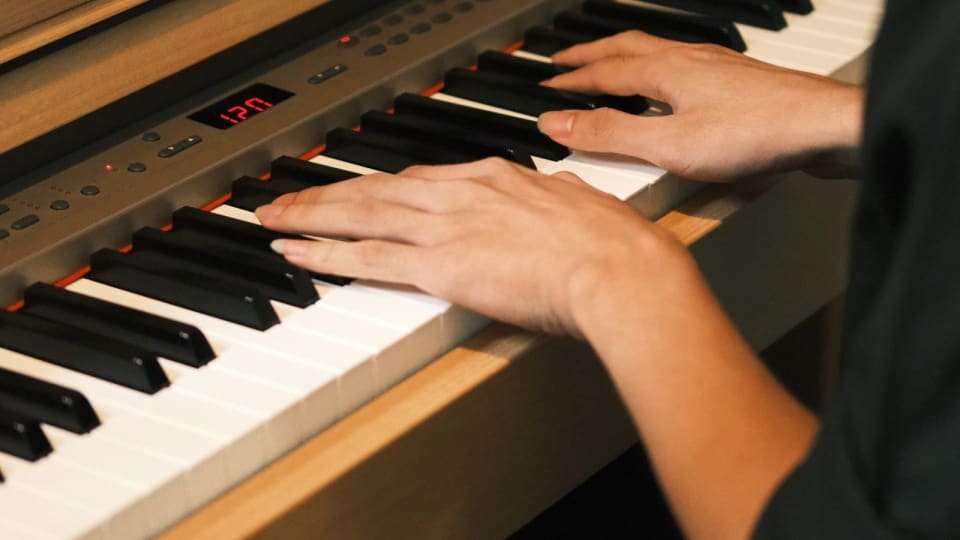
Photo: Daniil Kondrashin via Pexels
Who should choose Flowkey instead of another piano app
Choose Flowkey if the main goal is learning songs from a guided score. This is the adult learner who likes seeing notation, wants a pianist video for reference, and is willing to repeat small sections until the hands settle. Flowkey is also a good fit for returning adults who read slowly but do not want to start from zero again. It respects the desire to play music that sounds like music.
Choose something else if the main goal is a more formal curriculum. Piano Marvel may suit learners who want assessment, sight-reading structure, and a more practice-system feel. Skoove may appeal to adults who want a lesson-path experience with a different balance of explanation and feedback. A teacher plus a method book is still the safest choice for technique-heavy goals, especially classical playing, exams, or long-term repertoire building. Our post on piano apps without gamification is a better next stop if Flowkey still feels too app-led.
Flowkey is also not the best answer if the adult learner has no interest in the available song library. That sounds obvious, but it is the whole product. The loop tool, hand selection, video, and Wait Mode matter most when the learner wants the piece badly enough to repeat it. If the arrangements do not match the music the adult wants to play, the app loses much of its advantage.
Choose Flowkey if this sounds like you
Song-first adult
You practice more when the target is a real piece, not an abstract lesson.
Visual learner
You benefit from seeing hands, fingering, and notation together.
Returning beginner
You remember some basics and want structured help learning pieces again.
How to use Flowkey without becoming dependent on it
The best Flowkey routine is not complicated. Start with the app's supports on. Use Wait Mode to identify notes, watch the video when fingering is unclear, and isolate a loop that is smaller than the full phrase. Then remove one support at a time. First play at a slow fixed tempo. Then play without the hand video. Then play from the score only. Then start from the middle of the section, because that reveals whether the passage is actually known or only memorized from the app's sequence.
Adult learners should keep a small non-app practice block after each Flowkey session. Five minutes is enough. Use that time to read a printed page, write down the hard bar, count aloud, or play a scale related to the piece. This prevents Flowkey from becoming the only environment where music feels possible. It also connects the app to actual practice habits, which matters for anyone trying to avoid the scattered pattern described in using a practice log without turning it into homework — logging what you worked on outside the app, in a notebook or a dedicated tracker like Practis, is what turns Flowkey sessions into progress you can see rather than songs you sampled.
If a piece still collapses after several days, do not add more Flowkey time first. Shrink the loop, slow the tempo, and check whether the issue is reading, fingering, rhythm, hand coordination, or tension. Flowkey can help with the first three. It is weaker on the last two. That is the point where recording yourself or asking a teacher can save weeks of repetition.
The final recommendation is simple: Flowkey is worth trying if the adult learner wants songs, notation, and guided repetition more than a game-like course. It is one of the better app choices for adults who already suspect that music itself has to be the motivation. Just do not let the app do all the deciding. The goal is to use Flowkey until the score, hands, and ear become clearer, then gradually need the app less.
More on apps.

How We Test Music Apps: Our Review Methodology
A review is only as trustworthy as the process behind it. This is exactly how the Pract.is editorial team tests, scores, and keeps its music-app reviews honest — the method behind every verdict, in full.
Pract.is Editorial

Is a Piano Learning App Enough? The Evaluation Framework
"Is a piano app enough?" has no universal answer, because it's the wrong question. The right one is "enough for what?" — and it has a systematic answer. The framework for deciding when an app suffices and when it doesn't.
Pract.is Editorial
Skoove vs. Flowkey vs. a Real Teacher: The Adult Learner's Decision
Search "best online piano lessons for adults" and you get a wall of apps — but the real decision is between three genuinely different things: a guided course app, a song-first app, and a human teacher. Which job are you actually buying?
Pract.is Editorial