

iReal Pro is still the best all-round pocket chord book and virtual band for most jazz musicians. Its alternatives win only when they do one narrower job better: cost nothing on desktop, phrase like a more active trio, use recorded players, build a detailed arrangement, or remember what happened after the backing track stopped. Switching without naming that job usually produces a more complicated version of the same practice session.
Features, platform support, and public US prices were checked against official pages on August 10, 2026. Store prices can vary by country and platform.
First decide which part of iReal Pro you are replacing
iReal Pro does three jobs unusually well in one small app. It stores and edits chord charts, generates an accompaniment from those changes, and includes practice controls such as section loops, automatic tempo increases, key cycling, transposing-instrument display, and a mixer. Its current official page lists more than 50 included styles, thousands of community-shared charts, offline use, and one-time purchases rather than a subscription. The US App Store and Google Play currently show $21.99, with each platform purchased separately.
Older comparisons often recommend an alternative because iReal Pro was absent from Windows or Linux. That advice is now stale. iReal Pro officially supports iPhone, iPad, Mac, Android, Windows, and Linux, and the current jazz styles can use recorded drums instead of an entirely MIDI rhythm section. A free seven-day trial is available on the desktop platforms, so platform support alone is no longer a strong reason to leave.
Most alternatives improve one of those columns and weaken another. SessionBand sounds more like recorded musicians because it is built from recorded loops, but it is less open-ended. Impro-Visor can turn harmonic analysis and written solo construction into the practice task, but it is not a frictionless phone fake book. Band-in-a-Box can build something close to a finished arrangement, but opening it for a quick chorus of rhythm changes is a very different proposition.
"The useful alternative is not the app with the longest feature list. It is the one that changes what the rhythm section asks of you."
Practis and Takt fit when accompaniment is not the missing part
Practis and Takt are our products, and neither is a direct iReal Pro clone. Practis does not generate piano, bass, or drums from chord symbols. Takt is a metronome, not a backing band. If the goal is to call up a standard, transpose it, mute the piano, and start soloing, iReal Pro or one of the alternatives below is the right category.
The combination makes sense when the music already comes from a Real Book, a teacher, a rehearsal recording, an Aebersold track, or an app the player intends to keep. Practis keeps repertoire, session notes, recordings, goals, tempo history, and weekly patterns together. Its free plan covers five active pieces, while Pro removes the limits and adds deeper analysis and score tools. That answers a question a backing track cannot: what changed across the last six attempts at the same standard?
Takt is our free Android metronome. It includes custom meters, subdivisions, per-beat accents, a tempo trainer, polyrhythm practice, and Drift Mode for holding pulse without chasing a perfectly fixed click. Dropping the piano, bass, and drums for one chorus often reveals time problems that a busy backing track was politely covering. Our post on when a metronome helps and when it gets in the way gives that switch a more deliberate structure.
This is also the lightest option for someone who already likes iReal Pro. Keep its excellent chart library and fast playback, then use a quieter tool for the work around it. A short note such as “lost the bridge at 152, start next time from the last two bars of A2” is more useful than another unlabelled 40-minute session. The same principle is behind using a practice log without turning it into homework.
JJazzLab is the strongest free direct alternative
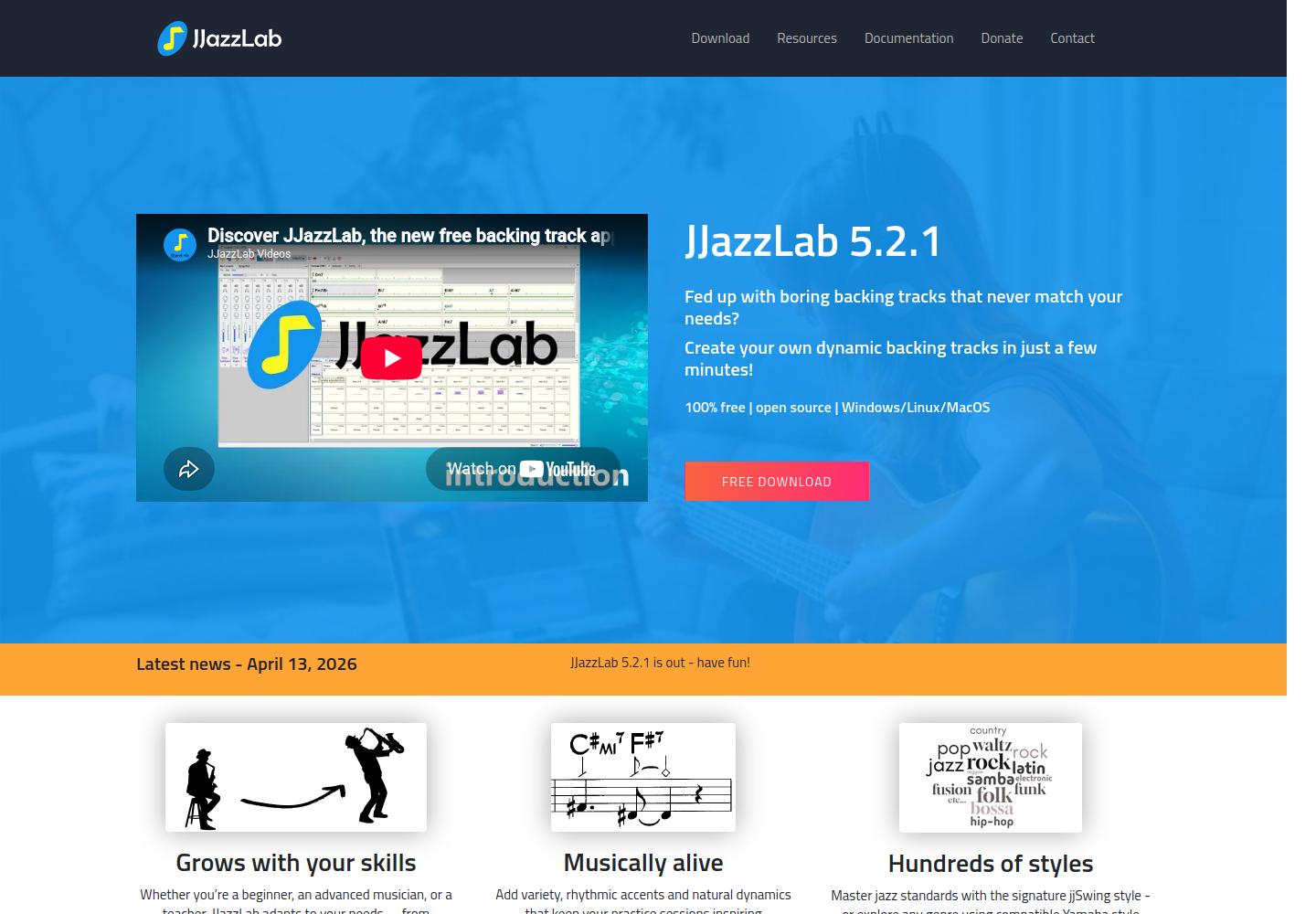
JJazzLab is the closest answer to “iReal Pro, but free on a computer.” The current 5.2.1 release is open-source and free without ads on Windows, macOS, and Linux. Enter chord symbols, divide the form into song parts, choose a rhythm, adjust the mix, and generate a backing track. It is a real alternative rather than a generic sheet-music reader that happens to display chords.
The program goes deeper than its price suggests. JJazzLab supports hundreds of rhythms, including compatible Yamaha style files, and its recent jjSwing rhythm focuses on more natural walking bass and drums. The mix console exposes individual tracks; bar annotations and an Easy Reader view keep the current changes visible; user tracks and a piano-roll editor allow custom material; and the result can leave as MIDI, WAV, or MP3. Version 5.2.1 also added a selectable restart bar inside loop mode, which is genuinely useful for practising a short form without building a full arrangement first.
The cost is setup. JJazzLab is a desktop application, not a phone app to open on the bandstand. On macOS the developer explains that the package is not Apple-notarized and asks users to install FluidSynth first; Windows may show a security warning because the installer is not code-signed. Linux audio configuration can also require attention. The official download page documents those limitations openly, but they still make JJazzLab a less casual purchase than its zero-dollar price implies.
Impro-Visor is free, but its real subject is the solo
Impro-Visor also runs free on Windows, macOS, and Linux through Java, and it can generate rhythm-section accompaniment from a lead sheet. The difference is purpose. Developed at Harvey Mudd College, it is designed around constructing, hearing, analysing, and revising improvised lines. It can colour notes by consonance, analyse harmonic “bricks,” store licks, generate ideas from editable grammars, loop any segment, and export MIDI or MusicXML.
That makes it valuable for a player who wants to write a chorus over “All the Things You Are,” hear every line against the changes, and examine why it works. It is less convincing as the everyday band-in-a-pocket replacement. The latest official release is version 10.2 from 2019, the interface shows its age, and Java/MIDI setup is more exposed than on a modern mobile app. Choose it because written solo construction is the method, not merely because it is free.
Genius Jamtracks makes the trio more demanding
Genius Jamtracks is the most interesting alternative for a jazz player who is bored by predictable comping rather than frustrated by iReal Pro's chart editor. Its official FAQ lists more than 1,300 standards and 27 styles across swing, Latin, even-eighth, ballad, open, half-time, and freer settings. The app runs on iOS and Android; the current US App Store price is $19.99.
The useful difference is not just a nicer sample set. Piano and bass use voice leading, the trio adapts its phrasing as tempo changes, and the player can decide whether individual instruments sit ahead of, on, or behind the beat. Five harmony levels move from triads through written chords to jazz voicings, substitutions, and advanced reharmonization. Polyrhythm controls can give selected instruments specific groupings or ratios, which turns the accompaniment into a rhythmic problem rather than neutral wallpaper.
Those controls also create the main warning. A reharmonizing, rhythmically active trio can make a simple tune feel fresh, but it can obscure whether the player has learned the original harmony. Set Harmony Level 2 when the purpose is accurate work on the written changes, then add substitutions later. Similarly, start with the time-placement controls neutral before asking the bass to sit behind and the piano to push ahead.
The following comparison by jazz pianist Thembi Dunjana is useful because it lets the two apps be heard rather than judged from feature lists. She moves through Genius Jamtracks' modern-jazz, open-swing, harmony, and rhythm controls before returning to iReal Pro's chart library and export tools.
SessionBand chooses recorded players over open-ended harmony
SessionBand Jazz takes a different route. Each of its three iOS volumes costs $8.99 in the US App Store and includes about 16,000 chord-based loops performed by session musicians. Volume 1 covers 15 core styles from ballad and medium swing to bossa, shuffle, Afro jazz, and fast Latin. The app can transpose a track, change tempo within a supported range, mute or solo parts, loop sections, record audio, and export a royalty-free result.
The recorded performances give drums, bass, piano, and horns a texture that note-by-note generation struggles to copy. The tradeoff is a narrower vocabulary. Each volume supports a defined set of chord types, styles, and tempo ranges, and the three volumes do not share the same content. It is also an iPhone and iPad product, with no Android or desktop edition, and the App Store version history shows the last software update in March 2023.
SessionBand is a strong choice when sound matters more than unlimited editing, especially for a singer or soloist making polished play-alongs from familiar changes. It is a weak choice for someone who needs the giant iReal community library or routinely enters unusual forms and harmonies. Buy one volume whose styles fit the actual repertoire before considering the bundle.
"A backing track can sound more human and still be less useful if it cannot follow the harmony you need to practise."
Band-in-a-Box is a studio upgrade, not a pocket substitute
Band-in-a-Box begins with the same simple action as iReal Pro: type chord symbols, choose a style, and press play. It then keeps going. Tracks can combine MIDI with RealTracks and RealDrums recorded by musicians, accept intros, endings, pushes, holds, shots, melodies, solos, audio, lyrics, and detailed song settings, then move into a DAW or finished audio file. The 2026 release is current on both Windows and macOS.
The entry-level Pro package is currently $129 for a first-time buyer. PG Music lists more than 800 RealTracks and RealDrums in Pro on Mac and more than 850 on Windows, while the larger packages climb into thousands of recorded parts and styles. The official sales FAQ currently lists MegaPAK at $269 and UltraPAK at $469, before the still larger editions. This is purchased software rather than a monthly service, but annual versions and content-heavy upgrade paths make it a materially bigger commitment than iReal Pro.
The sound can be excellent because RealTracks are assembled from recorded performances rather than relying only on a general MIDI synth. The cost is decision load, disk space, and time. A musician can audition styles, regenerate individual parts, edit the arrangement, choose a different RealTracks player, work with stems, and polish the mix when the original goal was ten minutes of improvising over a blues. Band-in-a-Box is best for teachers making custom play-alongs, songwriters building demos, and players who want the arrangement itself to become part of the work.
For a quick tune at rehearsal, iReal Pro remains faster. For a custom track with a specific drummer feel, a four-bar intro, a bass solo, held chords in the final chorus, and an audio export for students, Band-in-a-Box is operating in another class. It should be compared with arranging software and a small production setup, not only with a phone app.
Compare the alternatives by the compromise you can hear
This table keeps the recommendation attached to the missing job. Prices are reference points from official US or developer pages, not promises about every regional store. “Free” also does not mean equally easy: JJazzLab asks for desktop setup, while Impro-Visor asks the player to accept older software and a notation-led workflow.
| Option | Best use | Platforms | Price checked | Main compromise |
|---|---|---|---|---|
| Practis + Takt Our tools |
Repertoire, practice memory, recordings, pulse, and rhythm training | Practis: web, iOS, Android Takt: Android |
Free entry; optional Practis Pro | No chord-chart backing band |
| JJazzLab | Free, editable desktop backing tracks | Windows, macOS, Linux | Free, open source | No mobile app; setup has friction |
| Genius Jamtracks | Reactive jazz-trio phrasing and rhythmic challenge | iOS, Android | $19.99 on US App Store | Narrower genre focus and more controls to manage |
| Band-in-a-Box | Custom arrangements, RealTracks, exports, and production | Windows, macOS | Pro from $129 | Cost, storage, and complexity |
| SessionBand Jazz | Recorded session-player loops and polished audio | iPhone, iPad | $8.99 per Jazz volume | Fixed chord/style vocabulary; no Android or desktop |
| Impro-Visor | Writing, hearing, and analysing jazz solos | Windows, macOS, Linux via Java | Free, open source | Old interface and a composition-first workflow |
No table can tell whether the comping leaves the right amount of space for a particular instrument. A pianist needs to know whether the generated piano can be muted cleanly. A bassist needs a convincing drums-and-chords combination without the app's bass line. A drummer may care less about harmonic playback and more about whether the bass phrase locks predictably with the ride pattern. Those differences appear within minutes when every app is given the same tune.
Run the same four-pass audition before switching
Use one standard you know well, not the app's most flattering demo. A medium-tempo blues is useful for hearing repetitive language; a 32-bar tune with a bridge tests form; and one awkward final turnaround exposes editing speed. Keep the test to about 20 minutes so software setup does not become a hobby of its own.
Then turn the track off and keep the same tempo for one chorus. This is the control condition. If the time collapses immediately, the app was supporting more than it was teaching. A metronome, a drum-only pass, or alternating audible and silent bars may be the better next task. The goal is not to reject backing tracks, but to stop them from hiding the exact weakness the session was meant to expose.
Loops should also be smaller than a full chorus when one connection is failing. Isolate the two bars before the bridge, the bridge entrance, and one bar after it, then restore the surrounding form. The method in our post on isolating a passage instead of replaying the whole piece applies just as well to changes and improvised lines.
Keep iReal Pro if its fast charts, community library, and portable rhythm section already get out of the way. Choose JJazzLab when free desktop control matters, Genius Jamtracks when the trio needs to challenge the phrasing, SessionBand when recorded texture matters most, Band-in-a-Box when the arrangement deserves studio-level attention, or Impro-Visor when writing the solo is the practice. The right switch should make the next chorus more revealing, not merely give it a different interface.


