

Three subscriptions can all mark a wrong note and still lead to very different practice. Simply Piano supplies a beginner sequence, Flowkey makes a chosen song easier to study, and Piano Marvel treats reading and assessment as a longer curriculum. The useful question is which kind of help you still need after the first week.
Piano Marvel vs Flowkey vs Simply Piano: the practical answer
Simply Piano is probably the easiest fit for a complete beginner who wants each lesson chosen in advance. Flowkey gives a returning adult or song-motivated learner more freedom over repertoire and practice pace. Piano Marvel asks more of the setup, especially when accurate scoring matters, but it provides the clearest path for sight-reading, teacher assignments, and measurable progress.
The table keeps the first decision compact. Prices appear later because account type, billing route, and free access change the comparison.
| App | How learning is organized | Most useful practice tools | Main constraint |
|---|---|---|---|
| Simply Piano | A guided course with Soloist and Chords paths, short workouts, and songs unlocked alongside progress | Immediate note feedback, slowable songs, tailored exercises, and short Workouts on some iOS accounts | No Windows desktop version; prices and available plans vary by store, country, and offer |
| Flowkey | Courses sit beside a large song library, so learners can follow a sequence or work on a specific piece | Wait Mode, looping, slow motion, separate-hand practice, and pianist video beside notation | The freedom to browse can leave a new learner unsure about the next course or song |
| Piano Marvel | Method, Technique, library work, reports, and the SASR sight-reading assessment form a measurable syllabus | Scored attempts, measure slicing, custom tempos, score uploads, reports, and leveled sight-reading | The most reliable experience uses Chrome or iOS with a connected MIDI keyboard; Android remains beta |
Readers who have already narrowed the decision to a pair can use our adult-specific Simply Piano vs Flowkey comparison, the focused post on Piano Marvel and Flowkey, or the post on Piano Marvel and Simply Piano after the first few months. This three-way page applies the same setup, transfer, and pricing questions to all three.
The same five tasks expose three different teaching plans
A free account or trial becomes more informative when every app receives the same material. Use a keyboard you actually intend to practise on, and keep one short piece or eight-bar passage constant.
The connection stage favors Simply Piano and Flowkey for acoustic-piano owners because both can listen through a device microphone. Piano Marvel supports microphone assessment only on iPhone and iPad, and its own requirements page says that mode becomes less accurate at higher levels. Its recommended setup is a computer running Chrome or the iOS app with a wired MIDI keyboard.
The next stages show how strongly each product directs the session. Simply Piano keeps the learner inside a course path. Flowkey places courses and thousands of songs beside each other, so the learner has more say. Piano Marvel moves between Method, Technique, library pieces, and assessment. None of those approaches is automatically more rigorous; the useful one is the structure that still produces a sensible task on a tired weekday.
The final transfer stage is easy to skip. A learner can become fluent at following a cursor while remaining hesitant when the cue disappears. Try the same bars from ordinary notation, then listen for pulse, articulation, balance, and continuity without waiting for a score animation.
Flowkey vs Simply Piano is library freedom versus course momentum
Simply Piano begins with a highly guided route. Its current help center describes separate Soloist and Chords paths, with lead-sheet courses drawing on both. Piano Basics and Touch Intro are available free, while subscribers unlock the wider course and song areas. Some iOS accounts currently include short Workouts for reading, rhythm, and theory away from the piano.
The Google Play listing currently describes more than 5,000 songs and step-by-step work from reading music to playing with both hands. The number is large, but the experience still feels course-led because songs unlock in relation to progress and are adjusted to the learner's level. That suits someone who wants fewer decisions at the start. It also makes Simply Piano unusually practical for a household: its Family plan supports up to five separate profiles, while an iOS Duo option covers two people.

Flowkey gives the song player more room. Its defining screen places a pianist's hands beside standard notation, then adds Wait Mode, looping, reduced speed, and separate-hand practice. Those controls are particularly useful when a learner already knows what piece to attempt and needs to divide it into manageable work.
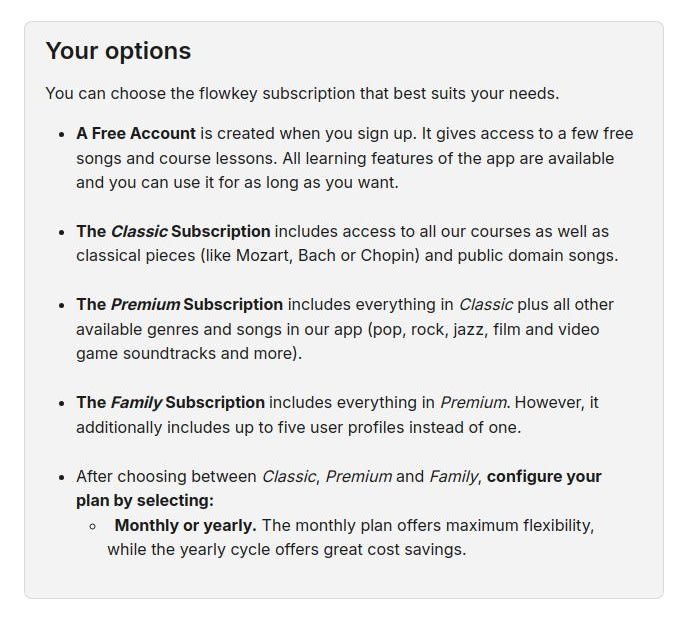
The courses cover fundamentals such as notation, chords, theory, and improvisation, but Flowkey does not require the same sense of marching through one path. A returning pianist can open a familiar song quickly. A first-time beginner may appreciate that freedom or spend too much time browsing. The free account is enough to test the complete learning interface with a small selection of songs and course lessons.
Piano Marvel changes the comparison after the first month
Piano Marvel becomes more interesting when the goal is broader than completing a familiar song. Its Method and Technique areas organize a long sequence of reading and keyboard skills. Practice and Play modes work with sliced sections, allowing learners to isolate measures, separate the hands, change tempo, and receive a score. Teachers can use reports and custom collections, while Premium users can upload music through MIDI, MusicXML, and audio-supported workflows.
The distinctive feature is the Standard Assessment of Sight-Reading. Piano Marvel describes thousands of excerpts across 90 sublevels, with the difficulty adapting as the test continues. A score history cannot judge musical character, but it gives a reader a repeatable benchmark that Simply Piano and Flowkey do not offer.
Its free tier is substantial enough for a real trial: the current pricing page lists more than 150 songs, more than 200 lesson exercises, 25 video lessons, and performance scoring. Premium expands the catalog beyond 25,000 songs, adds more than 1,200 lesson exercises and 200 videos, and enables uploads. The tradeoff is practical. Wired MIDI and a larger screen suit this system better than a phone listening to an acoustic piano from across the room.

Feedback is accurate about notes and limited about playing
All three apps can listen through a microphone in at least some supported setups, and all benefit from MIDI when a digital instrument can send it. Simply Piano says a wired MIDI connection gives perfect note recognition. Flowkey describes direct MIDI as nearly perfect because the app reads note data instead of separating piano sound from room noise. Piano Marvel also recommends wired MIDI for its best experience.
That distinction matters most with chords, accompaniment coming from the device, background noise, or a piano that is not at standard pitch. Microphone recognition is convenient and often sufficient for the early course. MIDI is more dependable when the software is expected to score timing and several simultaneous notes. Simply Piano supports Bluetooth MIDI on iPhone and iPad but not Android; Flowkey's current Android guide supports USB and Bluetooth MIDI, while noting that reconnection may be needed.

Reliable note detection still has a narrow field of view. The app may know that C, E, and G arrived together, but it does not know whether the wrist was rigid, the fingering will survive at tempo, the melody projected above the accompaniment, or the pedal blurred the harmony. Piano Marvel offers the most formal scoring here, Flowkey gives the clearest tools for repairing a song section, and Simply Piano keeps feedback closely tied to a guided course. Physical ease and sound quality still need the learner's attention or another person listening.
Price changes with the number of learners and the billing route
Simply Piano is the difficult row because its official help center no longer presents one universal figure. It says prices vary by country, platform, Individual or Family plan, and limited offer. Flowkey publishes US examples for three tiers. Piano Marvel publishes a simple individual price, with separate arrangements for studios and schools.
| App | Free route or trial | Current public price information | Account detail that affects value |
|---|---|---|---|
| Simply Piano | Piano Basics and Touch Intro are free. A seven-day trial may appear with an annual plan and is limited to one per account or Apple ID. | The official subscription page directs users to the in-app or web checkout for their actual monthly or annual offer. | Individual, iOS Duo, and Family options vary. Family provides up to five profiles and access across the Simply app bundle. |
| Flowkey | The free account has a few songs and course lessons with all learning features. Annual plans normally include a seven-day Premium trial. | US examples: Classic $16.49/month or $99.99/year; Premium $24.99/month or $149.99/year; Family $37.49/month or $224.99/year. | Classic excludes licensed pop and soundtrack catalogs. Classic and Family are bought through the web app; Family includes Premium content for up to five profiles. Prices vary by location. |
| Piano Marvel | The ongoing free plan includes 150+ songs, 200+ lesson exercises, 25 video lessons, performance scoring, and up to three SASR tests. | $17.99/month or $129.99/year for individual Premium at the time of publication. | Schools and studios can request personalized pricing; individual teachers and students otherwise use Premium accounts. Premium adds uploads and the larger content library. |
Flowkey says subscriptions renew unless canceled at least 24 hours before renewal and offers a 14-day money-back guarantee. Simply Piano also renews automatically, with billing managed through the original platform. Piano Marvel says cancellation stops future charges after the current paid term, and its terms allow refund requests within 14 calendar days of payment. Anyone considering an annual plan should take a screenshot of the exact checkout offer and renewal date because the Simply Piano figure in particular may differ from another person's.
Run the trial with your own piano before subscribing
Use the same instrument, device position, headphones, and short passage in every trial. Check whether the app hears full chords, whether a difficult two-bar section can be isolated, and whether the feedback changes the next repetition. Then remove the moving prompt and play the passage again. That last attempt shows how much of the work has transferred to the piano.
Simply Piano's free beginning reveals whether its pacing feels reassuring or restrictive. Flowkey's free account exposes the full practice interface, so it is easy to test Wait Mode and the song presentation before paying. Piano Marvel's free library is large enough to judge the denser interface, MIDI setup, scoring, and sight-reading approach over several sessions.
If all three stall on the same passage and the cause is still unclear, another annual app plan is unlikely to solve it. A teacher can see fingering, tension, balance, and movement that these feedback systems do not measure.


