Flowkey is already very good at helping someone learn a song from its catalog. The best Flowkey alternative is therefore not a cheaper copy. It is the product that handles the part Flowkey leaves unfinished: your own scores, independent reading, stricter timing feedback, deeper teaching, or several beginners under one roof.
The short answer is Practis for music chosen elsewhere, Piano Marvel for reading, Playground Sessions for a more demanding interactive system, Skoove for a guided mobile course, Pianote for human explanation, and Simply Piano for an easy family start.
Features, platform support, free access, and public prices were checked against official pages on August 10, 2026. Prices can vary by country, app store, promotion, and billing route.
Flowkey is strongest when the song is the curriculum
Flowkey's appeal is easy to understand. Pick a piece, watch an expert pianist's hands above the notation, isolate either hand, slow the playback, or loop a short passage. Wait Mode listens through a microphone or MIDI connection and holds the score until the expected notes arrive. The interface stays calm, the notation remains visible, and there is less arcade pressure than in many competing apps.
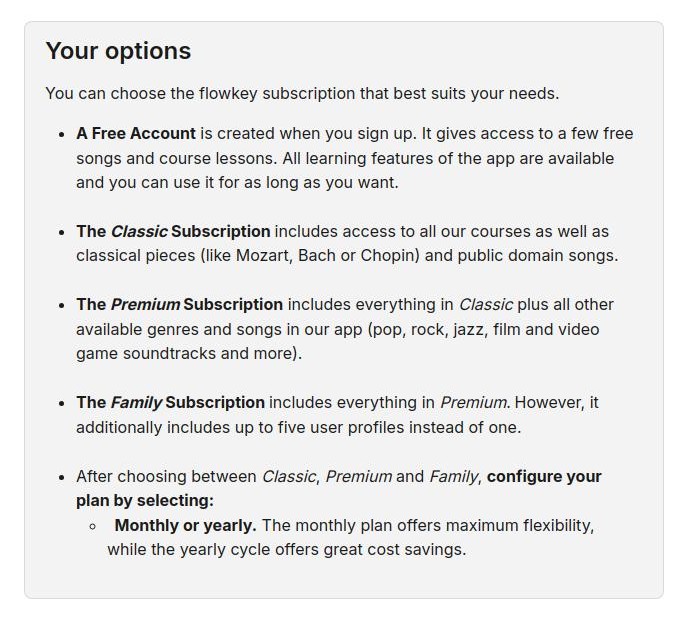
The current plan structure is more complicated than the old version of this page suggested. Flowkey's free account now includes a few songs and course lessons with the learning features available inside that sample. Classic includes all courses plus classical and public-domain music. Premium adds pop, rock, jazz, film, television, and video-game repertoire, while Family extends Premium to as many as five accounts.
The official Flowkey plan page currently uses these US prices as examples: Classic is $16.49 monthly or $99.99 yearly, Premium is $24.99 monthly or $149.99 yearly, and Family is $37.49 monthly or $224.99 yearly. Prices vary by location. Yearly plans include a seven-day Premium trial, and Flowkey states a 14-day money-back guarantee. Those details matter because the cheapest plan does not unlock every song shown across the product's marketing.
Flowkey works on supported iOS and Android devices and through a browser on computers, Chromebooks, and compatible Windows tablets. Amazon Fire tablets are not supported. A cable or MIDI connection gives more dependable note recognition than a room microphone, especially when chords, resonance, or background noise are involved.
The limitation is not that Wait Mode is bad. It is that waiting and playing in time are different tasks. A passage can advance perfectly when the score pauses after every event and still lose its pulse when the waiting is removed. The full Flowkey review for adult learners covers that tradeoff in more detail. This guide starts after the learner has identified what needs to work differently.
"Leaving Flowkey only helps when the replacement changes the part of learning that has stalled."
Practis is the alternative when the music is already chosen
Practis is our product, and it is not a piano course. It will not teach middle C, arrange licensed pop songs into levels, or score every note as it passes. A complete beginner who needs Flowkey to select and demonstrate material should keep Flowkey or choose another teaching system below.
Practis becomes useful when the curriculum already exists. A teacher may assign a sonatina, scales, and one sight-reading page. An adult may own a method book and three scores. In either case, another stream of app-selected songs creates more choices without remembering where bar 27 failed, which fingering was changed, or whether the target tempo held on Tuesday.
The free plan supports up to five active pieces with a practice diary, history, streaks, daily and weekly goals, and limited planning help. Pro is $39.99 yearly or $4.99 monthly after a free first month. It adds unlimited repertoire and sessions, recordings, recaps, scheduling, tempo trends, reports, score sync, and performance heatmaps. The boundary is simple: Practis organizes the work, while a teacher, score, or course supplies the work.
This can also be a pairing rather than a clean break. Keep Flowkey for the arrangements that genuinely motivate practice and use Practis for teacher assignments, printed scores, recordings, and everything Flowkey does not hold. Paying for one useful catalog is reasonable. Expecting that catalog to become the entire practice system is where the mismatch begins.
Piano Marvel and Playground Sessions put feedback first
Flowkey's feedback is intentionally gentle. These two alternatives ask for more. Piano Marvel treats reading and graded exercises as skills that can be measured repeatedly. Playground Sessions keeps the song-led experience but adds more scoring, tempo control, backing tracks, and curriculum depth. Both interfaces feel busier because they expose more of the work.
Piano Marvel is the strongest free alternative for reading
Piano Marvel is the clearest move when the notes inside Flowkey make sense but reading away from the video does not. Its Method and Technique paths use standard notation, graded exercises, performance scores, and progress reports. The Standard Assessment of Sight Reading gives learners a repeatable reading task instead of asking them to infer fluency from completed songs.
The free account is substantial: more than 150 songs, more than 200 lesson exercises, 25 video lessons, and performance feedback and scoring. Premium costs $17.99 monthly or $129.99 yearly. It expands the library beyond 25,000 songs, allows uploads of your own music, and includes more than 1,200 exercises and 200 videos.
Piano Marvel runs across iOS, Android, Windows, Mac, and Chromebook setups, although a MIDI-capable instrument gives the most precise scoring. The interface is denser and less immediately inviting than Flowkey. That is a real cost for someone who practises because the screen feels calm, and a fair trade for someone who wants a syllabus, score uploads, and visible assessment. The direct Piano Marvel versus Flowkey comparison separates those priorities more closely.
Playground Sessions is the closest interactive upgrade
Playground Sessions is the closest replacement for someone who wants to preserve songs, video lessons, and immediate response while adding more control. Its current listings describe a Bootcamp across Rookie, Intermediate, and Advanced levels, hundreds of guided videos, more than 2,000 songs, several arrangements, loops, tempo changes, accuracy scores, backing tracks, and progress tracking. The learner can spend more time shaping a passage before moving on.
Playground is no longer MIDI-only. The current mobile apps can listen to an acoustic piano through a microphone or use a cable with a digital instrument. MIDI still gives more reliable timing and note data, but an acoustic-piano owner can now try the system without buying an interface first.
The current promotional prices are $19.99 monthly, $119.99 for the first annual year, and $239.99 for lifetime access. The lifetime plan includes licensed songs for two years; continued unlimited access to those songs is then $3.33 monthly, or songs can be purchased separately. Playground is the better direct replacement when detailed interaction matters more than Flowkey's visual calm. It is not the simpler product.
"More feedback is useful only when it changes the next repetition, not when it merely produces a larger score."
Skoove and Pianote solve two different teaching gaps
Someone leaving Flowkey for “better teaching” may mean one of two things. One learner wants another app to keep choosing the sequence, but with more bite-sized lessons and technique material. Another wants a person to explain movement, sound, phrasing, or a problem that note recognition cannot hear. Skoove serves the first need; Pianote serves the second.
Skoove offers a fuller guided mobile course
Skoove currently advertises more than 1,000 online lessons and courses covering reading, theory, technique, chords, classical music, and popular songs. It uses a moving score, video demonstrations, backing tracks, and real-time feedback through a microphone or connected keyboard. Three lessons are free with no time limit, so the pacing can be judged before entering a trial.
The public European plans are EUR 29.99 for one month, EUR 19.99 per month on a three-month term, and EUR 12.49 per month on a twelve-month term. The annual total is EUR 149.99 and starts with a seven-day trial. Regional and app-store prices can differ.
The important platform limit is easy to miss: Skoove removed its desktop learning platform. Lessons now run in the iOS and Android apps, while the website remains useful for account management. Flowkey still works through a desktop browser, so a pianist who keeps a laptop beside the keyboard should not switch without testing the mobile setup first. Choose Skoove when the guided course is the upgrade; do not choose it solely because it looks like Flowkey with a different catalog.
Pianote replaces note detection with human explanation
Pianote moves away from the listening-app model. Its progressive Method, teacher-led videos, workouts, community, live questions, and direct support can address posture, movement, tone, harmony, improvisation, and interpretation. Those are precisely the areas where a microphone's green check has very little to say.
The lessons-only membership is $25 monthly or $229 yearly. The plan with more than 950 popular songs costs $30 monthly or $279 yearly. Both currently include a seven-day trial, a 90-day money-back guarantee, and access to lesson libraries for guitar, drums, singing, and bass as well as piano.
The tradeoff is self-evaluation. Pianote does not watch every key and keep a running accuracy score, so the learner must listen, record, and ask useful questions. That can feel like losing support after Flowkey. It can also be the first time feedback addresses why a phrase sounds stiff instead of whether the expected pitch arrived. If the real decision is still app versus person, the comparison of Skoove, Flowkey, and a real teacher makes the boundaries clearer.
Simply Piano is easier for a family starting together
Simply Piano is the lower-friction alternative for a household with several new learners. It offers short step-by-step lessons, personalized five-minute workouts, a large song library, immediate microphone or MIDI feedback, and up to five profiles on a Family plan. The current Google Play listing advertises more than 5,000 songs and support for phones and tablets.
The subscription structure now includes Individual, Duo, and Family options, but Simply does not publish one universal price. The official help center says the amount varies by country, platform, and selected plan. Family provides five Premium profiles and access to the wider Simply app family, while Duo gives two Simply Piano profiles. Check the actual checkout screen rather than relying on an old annual price quoted by a comparison site.
Simply Piano is a good switch when Flowkey still asks for too much choice at the start of each session. It is a poor switch for an experienced adult who is already frustrated by app-selected progression, simplified arrangements, or limited control over outside repertoire. In that case, the move is sideways. The rebuilt Simply Piano alternatives guide covers its plans, platform limits, and stronger next steps.
Family value also depends on who is learning. Five profiles are useful if five people want a beginner-friendly sequence. They do not make the plan economical if one adult wants classical reading assessment, another needs teacher feedback, and a third already has assigned repertoire. Count matching learners, not available profile slots.
Compare the real cost, then run the same three sessions
The table keeps price beside the job and the limitation. Public prices were checked on August 10, 2026, before tax. “Free” means useful ongoing access rather than a brief trial; trials are labeled separately. Flowkey's new US monthly examples are shown even though the final local checkout can differ.
| Option | Best reason to switch | Free access | Public price checked | Important limit |
|---|---|---|---|---|
| Practis | Own scores, assignments, and practice history | Five active pieces | $4.99/month; $39.99/year | No piano curriculum or note scoring |
| Piano Marvel | Reading, exercises, and assessment | 150+ songs and 200+ exercises | $17.99/month; $129.99/year | Dense interface; MIDI gives best results |
| Playground | Deeper interactive songs and scoring | Trial | Sale: $19.99/month; $119.99 first year | More setup and interface complexity |
| Skoove | A fuller guided app course | Three lessons | EUR 29.99/month; EUR 149.99/year | Lessons are mobile-only |
| Pianote | Teacher-led explanation and support | Seven-day trial | From $25/month; $229/year | No automatic note-by-note scoring |
| Simply Piano | An easy start and multiple family profiles | Selected lessons and songs | Varies by plan, store, and country | Mobile and tablet course; app-selected path |
| Flowkey | Visible notation and song learning | A few songs and course lessons | Classic $16.49/month; $99.99/year | Full licensed catalog costs more |
The best free Flowkey alternative is not one universal app. Piano Marvel offers the strongest free reading and exercise package here. Practis is the useful free option when a teacher, score, or book already provides the material. Neither replaces a large licensed-song catalog for free, because that is the expensive part of Flowkey's product.
Do not judge a replacement with its easiest onboarding lesson. Use the same short piece or passage in three ordinary sessions so the differences come from the tool rather than the music.
If Flowkey still wins that test, keep it. If another product exposes a problem more clearly or makes outside music easier to practise, the switch has a reason. The goal is not to own the best-rated piano app. It is to need the screen a little less each month.