

The best Simply Piano alternative depends on which part of Simply Piano you want to replace. Choose Piano Marvel for stronger reading, Flowkey for songs and family profiles, Skoove for a calmer guided course, Pianote for human explanation, Playground Sessions for deeper interactive feedback, and Practis only when you already have music and need a better practice workspace.
That is a more useful answer than crowning one app. A family with an acoustic piano, an adult with a MIDI keyboard, and a learner who already takes lessons are solving three different problems.
Features, platforms, free access, and public prices were checked against official product pages on August 10, 2026. Prices can vary by country, app store, promotion, and billing route.
Simply Piano is still a strong starting point
Simply Piano succeeds because it removes almost every first-week decision. Put a phone or tablet near an acoustic piano, or connect a compatible keyboard, and the app supplies short courses, songs, five-minute workouts, and immediate right-or-wrong feedback. The current Google Play listing advertises more than 5,000 songs, microphone or MIDI recognition, a seven-day Premium trial, and up to five profiles on one family account. It remains one of the easiest ways to get a complete beginner playing with both hands.
The limits become clearer once the habit is established. Simply Piano runs on iOS and Android phones and tablets, but its help center says there is no Windows or desktop version. Its newer Play library includes listening, step-by-step teaching, auto-scroll, and adjustable tempo, yet the live Play and Feedback modes are currently available on iOS and not Android. A feature that looks universal in marketing can therefore produce a different experience in two households using the same subscription.
Pricing also needs care. Simply does not publish one universal rate in its help center. The current US App Store listing shows overlapping entries including Full Access at $19.99, Individual at $24.95, annual individual options at $119.99 and $149.99, and family entries at $34.95 and $179.99. Those labels can reflect different offers or billing periods, so the checkout shown on your device is the price that matters.

None of this makes Simply Piano a bad product. It means the reason for leaving must be more specific than "I want something better." Our Simply Piano review for adult beginners covers what the course teaches well and where app progress can look stronger than independent playing. This guide starts at the next decision: what should replace the part that no longer fits?
"Do not replace Simply Piano with the app that has the longest feature list. Replace the exact job that has stopped working."
Practis fits when you already know what to learn
Practis is our product, and it is not a piano course. It does not teach note names, arrange pop songs into levels, or score every key press. That makes it a poor substitute for a complete beginner who still needs a sequence. It becomes the better alternative when a teacher, method book, score library, or another course already provides enough material.
This is the point at which Simply Piano can start adding work instead of organizing it. A learner may already have lesson assignments, scales, three pieces, and one difficult passage, yet the app keeps presenting its own next lesson. Practis gives each piece a place for the score, annotations, goals, recordings, notes, time, and practice history. It changes the question from "which app level is next?" to "what changed in this piece today?"
The free plan supports five active pieces plus a practice diary, history, streak, and goals. Pro is $39.99 yearly or $4.99 monthly after a free first month, adding unlimited repertoire, recordings, recaps, analytics, reports, score sync, and performance heatmaps. Those features are useful only if the curriculum already exists. If it does not, choose one of the teaching platforms below first.

Piano Marvel is the best free alternative for reading
Piano Marvel is the strongest first test for anyone leaving Simply Piano because reading has not transferred away from the screen. Its Method and Technique tracks use graded exercises, standard notation, scoring, and progress reports. The Standard Assessment of Sight Reading presents short examples across 90 levels, which turns reading into a skill that can be tested again instead of estimated from completed songs. The interface is denser, but that density supports a more serious syllabus.
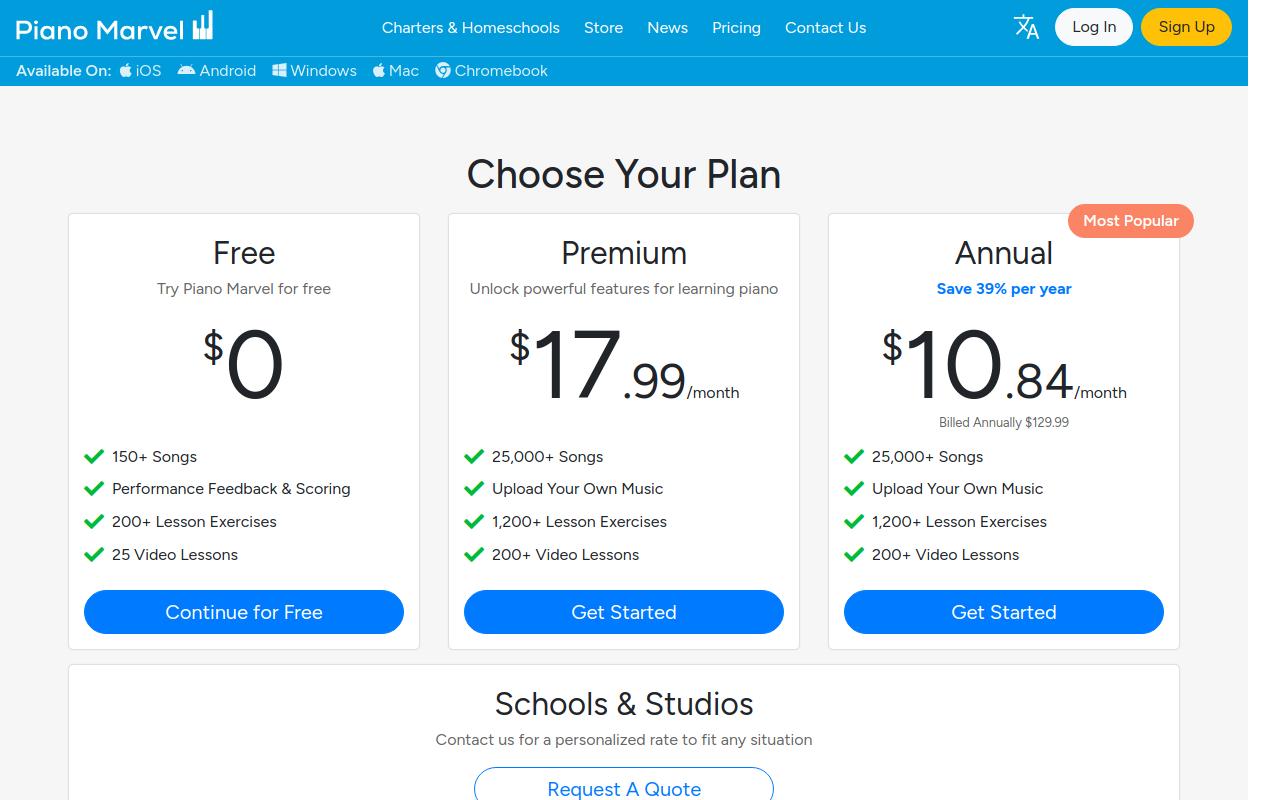
The free account is unusually useful. It includes more than 150 songs, more than 200 lesson exercises, 25 video lessons, performance feedback and scoring, and three sight-reading assessments. Premium costs $17.99 monthly or $129.99 yearly, expanding the library beyond 25,000 songs, allowing score uploads, and adding more than 1,200 exercises, 200 videos, and unlimited sight-reading assessment.
Piano Marvel works best with a MIDI-capable digital piano or keyboard because the connection gives precise note data. It also offers apps and computer access across a wider device mix than Simply Piano, including Windows and Mac options. It is not automatically better for a child who needs an inviting five-minute start or an adult who mainly wants popular songs. Our Piano Marvel versus Simply Piano comparison identifies the switch point more closely: when reading and independent practice become the bottleneck, the more rigorous interface starts to earn its keep.
Flowkey is better for songs and shared family access
Flowkey is the better move when the course structure is acceptable but the learner wants a calmer path into recognizable repertoire. It combines video demonstrations with visible notation, lets either hand be isolated, slows playback, loops sections, and offers a Wait Mode that pauses until the expected notes arrive. The score stays central, so the experience looks less like a sequence of game levels than Simply Piano. It still listens, but it asks the learner to spend more time following a piece.
The free account includes eight songs and selected course exercises with the learning tools available inside that sample. Paid access now has two individual catalogs. Flowkey Classic costs $16.99 monthly or $99.99 yearly and includes courses plus more than 1,000 classical and public-domain songs. Full access costs $24.99 monthly or $149.99 yearly and adds the licensed pop, film, television, and exclusive catalog.
Flowkey Family provides full access for up to five profiles at $37.99 monthly or $224.99 yearly. That makes it the closest replacement for a household currently using Simply Piano profiles, provided everyone wants piano. Before paying, search for five songs each learner actually wants and confirm the required tier. Our Flowkey review covers where Wait Mode helps, where it can hide unstable rhythm, and why the full catalog price matters.
The tradeoff is assessment depth. Flowkey can confirm expected notes and guide a piece, but it does not offer Piano Marvel's sight-reading test or a teacher's diagnosis of movement and tone. It is a repertoire choice first. Choose it when songs are the reason someone sits down, not because its polished interface looks more mature.
Skoove and Pianote offer two kinds of explanation
Simply Piano users often say they want "better teaching," but that can mean two opposite things. Some want the app to keep guiding every step while explaining more. Others are ready to give up automatic scoring in exchange for teachers who can discuss sound, movement, harmony, and interpretation. Skoove serves the first group; Pianote serves the second.
Skoove keeps the guided course
Skoove is the closest calmer course alternative. It currently advertises more than 1,000 lessons, step-by-step courses, real-time note recognition, moving notation, backing tracks, technique videos, music theory, and support from its instructors. It works with acoustic and digital pianos through microphone or MIDI input and runs on iOS and Android. A learner still receives a clear next lesson, but the presentation gives reading and technique more room.
The free account contains three lessons with no time limit and no card required. The public European pricing page lists EUR 29.99 for one month, EUR 19.99 per month on a three-month term, and EUR 12.49 per month on a twelve-month term. Skoove's help pages show different amounts for some app stores and countries, so compare the total charge shown at checkout rather than the monthly equivalent alone.
Choose Skoove when Simply Piano's pace or presentation is the problem but guided app learning still works. Do not expect a completely different learning model. It remains an app-selected curriculum with automated listening and a screen-led score. Our Skoove alternatives guide is useful if that model also starts to feel limiting.
Pianote replaces scoring with people
Pianote moves in the other direction. Its progressive Method, video lessons, workouts, community, live questions, and direct teacher access are built around explanation rather than note detection. A teacher can discuss why a wrist feels locked, how a chord voicing should sound, or why a phrase has no direction. Those are exactly the questions a microphone cannot answer.
The lessons-focused tier is $25 monthly or $229 yearly. The plan with more than 950 popular songs is $30 monthly or $279 yearly. Both currently include a seven-day trial, a 90-day money-back guarantee, community access, and lessons for guitar, drums, and singing as well as piano.
The absence of automatic note-by-note scoring is either the weakness or the point. A complete beginner who depends on immediate confirmation may feel less secure. A learner who already knows when a note is wrong but cannot explain why the phrase sounds stiff may finally receive the missing kind of help. Pianote is the best alternative here for human teaching, not the best imitation of Simply Piano.
Playground Sessions offers the deepest interactive replacement
Playground Sessions is the option for learners who want to keep feedback, songs, video teaching, and gamified progress while gaining more control over the work. Its Bootcamp spans Rookie, Intermediate, and Advanced levels, and the current app listings advertise hundreds of videos, more than 2,000 songs, multiple arrangements, looping, tempo control, accuracy scores, and progress tracking. The interface is busier than Simply Piano because it is trying to expose more practice tools.
An important limitation in the old version of this page is no longer true: Playground is not MIDI-only. Its current iOS and Android listings support microphone feedback for acoustic pianos as well as cable or MIDI connections for digital instruments. MIDI still provides the highest accuracy and feedback depth, but an acoustic-piano owner can now test the system without buying hardware first.

The current Playground membership page shows promotional prices of $19.99 monthly, $119.99 for the first annual year, and $239.99 for lifetime access. Read the lifetime terms carefully: two years of licensed-song access are included, after which unlimited copyrighted songs cost $3.33 monthly or can be bought individually. The curriculum and public-domain material remain, but "lifetime" does not mean every licensed song forever.
Choose Playground when Simply Piano feels too shallow but its responsive, song-led format still motivates practice. Piano Marvel is better when reading assessment is the main goal. Skoove is cleaner when a guided course matters more than a large interactive toolkit. Playground earns its extra complexity only if you will use the loop, tempo, arrangement, and scoring controls rather than simply moving to the next song.
Compare price, platform, and the job each app does
The table uses public prices visible on August 10, 2026. A sale price is labeled as a sale, and Simply Piano is deliberately listed as variable because its own support directs learners to the in-app offer. Annual plans should be compared by total charge, not the smaller monthly equivalent shown in large type.
| Option | Best for | Public price checked | Platform or input note |
|---|---|---|---|
| Practis | Own repertoire and practice history | Free; Pro $39.99/year | Web, iPhone, Android; not a course |
| Piano Marvel | Reading, exercises, and assessment | Free; $17.99/month; $129.99/year | Broad device support; MIDI is strongest |
| Flowkey | Songs and up to five family profiles | From $16.99/month; $99.99/year | Browser, iOS, Android; catalog has tiers |
| Skoove | Calmer guided app learning | EUR 29.99 monthly; lower on longer terms | iOS, Android; microphone or MIDI |
| Pianote | Teacher-led explanation and support | From $25/month; $229/year | Web and apps; no automatic note scoring |
| Playground | Interactive songs, scoring, and deeper controls | Current sale: $19.99/month; $119.99 first year | Desktop and mobile; microphone or MIDI |
| Simply Piano | Lowest-friction beginner and family start | Varies; US annual iOS entries from $119.99 | iOS, Android; no desktop; some features iOS-only |
A comparison table cannot show whether the new app will survive an ordinary week. Test one alternative with material you already know rather than starting with its most flattering onboarding lesson. The same short piece exposes setup friction, feedback delay, catalog restrictions, and whether the app helps you solve a mistake or merely rewards another completion.
Compare how quickly you can start, isolate a problem, and understand the feedback.
A useful app must still make the next action clear when novelty and enthusiasm are gone.
Check whether the system helps with your music, not only the content built to fit its method.
"The right replacement should remove one source of friction, not restart the same dependency with a different logo."
For a free start with real depth, choose Piano Marvel. For songs and shared household access, choose Flowkey. For a familiar but calmer course, choose Skoove. For human explanation, choose Pianote. For the strongest direct interactive replacement, test Playground Sessions with your actual instrument setup.
If lessons, scores, or another method already provide direction, skip the replacement course entirely and organize the practice you already need to do. Simply Piano is excellent at getting people started. The best alternative is the one that matches what starting has now turned into.


