Hooktheory is difficult to replace because it is several kinds of music software sharing one account. TheoryTab turns familiar songs into readable harmonic examples. Hookpad moves chords and melody around on a visual timeline. The interactive books and Chord Crush teach the theory and listening skills behind those choices.
For musicians mainly replacing Hookpad, ChordChord is the nearest browser-based sketchpad, while Scaler 3 offers much more control inside a production workflow. Chordbot is a capable $4.99 mobile arranger. Chordify works in the opposite direction by finding chords in an existing recording, and EarMaster covers structured theory and ear training. None of them recreates Hooktheory's complete path from analyzed songs to a new draft.
Hooktheory connects four different starting points
A search for a Hooktheory alternative often begins with Hookpad, but the product being left behind may be TheoryTab, one of the books, or Chord Crush. The useful comparison starts with the material already on the desk and what needs to happen to it next.
The current Hookpad plans make that breadth easier to see. Free includes tempo, transposition, looping, one melody voice, piano playback, and unlimited cloud saves, though its advanced palettes and searches run as one-minute previews. Standard costs $7.99 per month, $79 per year, or $199 for a lifetime license and adds full chord tools, lyrics, up to four melody voices, local saves, MIDI input, more than 500 instruments, and MIDI, score, lead-sheet, MP3, WAV, and track-stem export. A limited number of Aria generations are available without a subscription; unlimited use of the optional generative feature costs another $14.99 per month. Prices were checked on August 30, 2026 and can change.
Hooktheory says TheoryTab contains more than 75,000 analyzed songs. Its crowd-sourced transcriptions are editable and maintained by the community, a resource competitors rarely reproduce. Our music-app directory has a concise Hooktheory profile and a short list of related tools. Here, the comparison follows the writing and export workflow in more detail.
The tools differ before the first note is entered
This table follows the material into and out of each tool. Prices are current US web or app-store prices checked August 30, 2026. Regional pricing, promotions, taxes, and app-store billing can produce a different total.
| Tool | Starts with | Writing surface | Useful files out | Current price |
|---|---|---|---|---|
| Hookpad | Chords, melody, MIDI input, or reference audio | Browser timeline with theory-aware palettes | MIDI, score/lead-sheet PDFs, MP3/WAV, track stems | Free; $7.99/month, $79/year, or $199 lifetime |
| ChordChord | Prompt, microphone, pasted chords, or template | Browser blocks with melody, bass, drums, and lyrics | Track MIDI, WAV stems, MP3 mix, PDF piano chart | Creator $12/month or $99/year |
| Scaler 3 | Chord idea, MIDI, audio, or plugin instrument | Standalone and DAW timeline with multiple lanes | Audio, single or multitrack MIDI, chord-set XML | Desktop $99 once; iPad separate |
| Chordbot | Chord list and arrangement style | iOS or Android song sections and mixer | MIDI, WAV, editable Chordbot file | Lite free; Pro $4.99 |
| Chordify | A catalogue song, link, or uploaded recording | Beat-aligned chord playback and diagrams | Chord MIDI and PDF chord sheet on Premium | Limited free; annual plans from $24 |
| Moises | An uploaded audio or video file | Synced chords, lyrics, tempo, key, and separated stems | Audio stems and mixes; no chord export | First minute free; paid for full-song chords |
| EarMaster | A lesson, exercise, microphone, or MIDI input | Guided ear, rhythm, sight-singing, and theory drills | Results and progress rather than a song draft | Free subset; $49.95/year all-access |
These prices make the products look more comparable than they are. Chordbot costs less than one month of most subscriptions, yet it does not display or edit a melody. Scaler costs more upfront and introduces a much denser interface, while its plugin routing can remove several later setup steps for a producer.
A blank progression has three credible routes
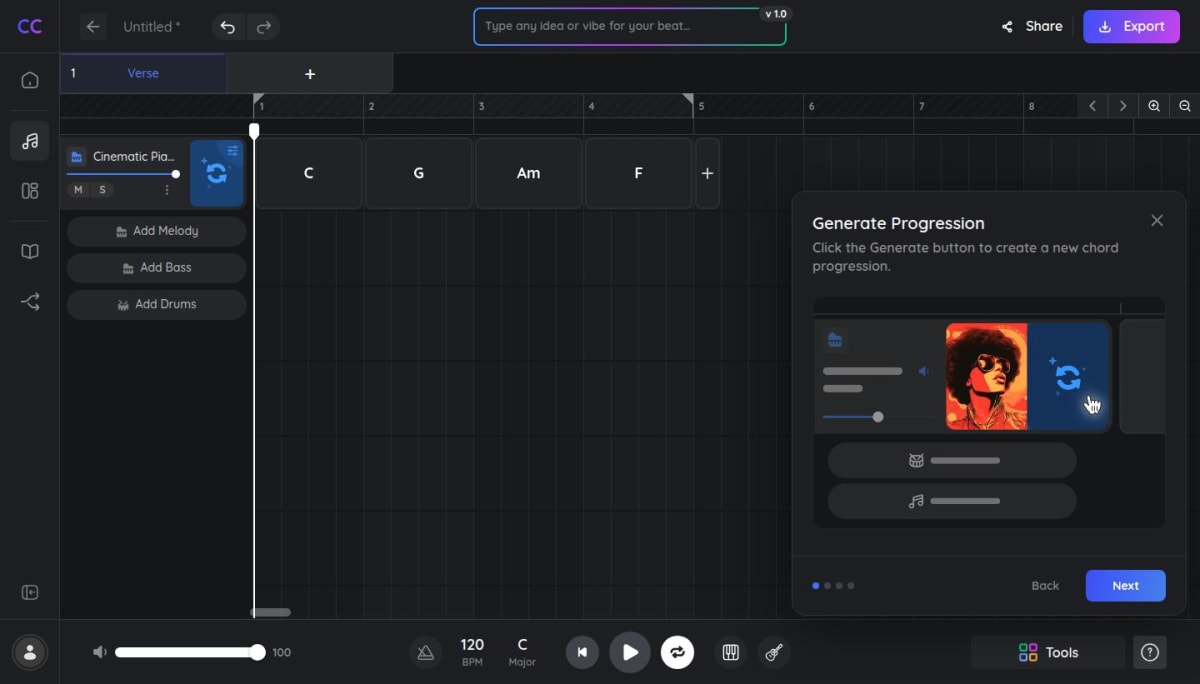
ChordChord keeps the draft in a browser
ChordChord is the closest substitute for the quick, audible side of Hookpad. It accepts a text prompt, pasted chord symbols, or chords strummed or played into the microphone, then turns them into editable blocks. Melody, bass, drums, lyrics, tempo, key, and voicing controls remain in the same browser project. Standard exports include separate MIDI tracks for chords, drums, and melody, individual WAV stems, an MP3 mix, and a PDF piano chord chart.
The current Creator plan is $12 per month or $99 per year. Pro is $27 per month or $147 per year and raises or removes project, export, separation, and AI-generation limits. ChordChord's own pricing FAQ says the current arranger supports 3/4 and 4/4, which matters for music in compound or changing meter. Its screen gives more space to generated accompaniment, while Hookpad keeps functional harmony and scale degrees more visible during the draft.
Scaler 3 moves deeper into production
Scaler 3 costs $99 for a desktop license and runs as a Windows or macOS standalone application and as a plugin in common DAW formats. A free trial is available through a Scaler account. It can detect chords, keys, and scales from MIDI or audio, build progressions from more than 1,000 chord sets, and suggest compatible or more adventurous next moves.
Its Arrange page has separate lanes for chords, melody, bass, and phrases. Scenes, modulation pathways, a piano roll, external MIDI routing, and third-party instrument hosting make a much larger working surface than Hookpad. Audio, single-track or multitrack MIDI, and Scaler chord-set XML can leave the application, and the plugin can drive instruments directly in a DAW. The iPad edition is a separate App Store purchase. Scaler has no TheoryTab-style searchable song library or integrated course, and its routing and performance tools take longer to learn than Hookpad's chord-and-melody grid.
Chordbot is small, mobile, and unusually inexpensive
Chordbot builds song sections from a chord list, then plays them with more than 70 arrangement presets or a custom mix of hundreds of instrument patterns. It supports more than 60 chord types, inversions, slash chords, smooth automatic voice leading, transposition, and editable sections. The free Lite version disables saving and export; the $4.99 Pro version exports MIDI, WAV, and its own shareable song format. It is available on iOS and Android, with no current browser or desktop version. There is no melody staff, lyric editor, song-analysis library, or formal course.
Starting from a recording calls for a different tool
TheoryTab begins with songs that people have already analyzed and organized. It can show melody alongside chords, convert harmony into Roman numerals, transpose everything into a common key, and expose recurring progressions across a large database. That makes it valuable for questions such as which songs use a particular progression or how a chorus behaves relative to its tonic.
Chordify takes an automated route. Give it a catalogue track or, on Premium or Premium Plus, an uploaded recording, and it estimates the chords and aligns them with the beat. Guitar, piano, ukulele, and mandolin diagrams support play-along use. Premium adds looping, tempo and key changes, PDF chord sheets, and MIDI downloads of the recognized chords.
The free allowance is two songs per day without an account or four with a free account. At the time of checking, annual US prices were $24 for Basic, $42 for Premium, and $54 for Premium plus Toolkit. Plan names and checkout offers can vary. Premium is the relevant tier for uploaded songs and downloadable chord files.
Automatic recognition saves time, especially when the immediate goal is to accompany a song. It can also misidentify a bass note, extension, passing harmony, or a chord under a dense mix. Chordify's own help material invites users to report and edit errors. The output therefore works best as a draft that is checked by ear and instrument, particularly before its MIDI is treated as source material.
Chordify does not recover a vocal melody or provide the same functional explanation as a community-transcribed TheoryTab entry. TheoryTab remains faster for comparing many songs already in its database. A private demo or an unlisted track can be uploaded to Chordify instead.
Moises also detects synchronized chords from an uploaded song, but it surrounds them with audio tools. The same project can separate vocals, drums, bass, guitar, piano, and other stems, display lyrics, identify the key, change pitch or speed, and create a practice mix. Web and desktop offer easy, medium, and advanced chord views; mobile uses bar or grid views and can simplify the displayed chords. Free accounts see chord detection for the first minute; Premium and Pro remove that limit.
Moises states that detected chords remain inside the app and cannot currently be exported as a chord sheet or MIDI file. Chordify supplies those PDF and MIDI routes. Moises provides more control over the recording itself, including the ability to isolate the part that made a chord hard to hear.

EarMaster covers lessons and ear drills
Hooktheory's two interactive books cost $14.99 and $19.99 as one-time purchases. They teach harmony and melody through sound and examples from familiar songs rather than treating the subject as a list of definitions. Chord Crush adds chord-recognition practice in a game format. Replacing Hookpad with a production tool does not replace either of those learning experiences.
EarMaster is the broadest structured substitute among the tools compared here. Its current curriculum spans interval and chord recognition, scales, melodies, rhythm reading and imitation, sight-singing, and jazz-oriented exercises. Microphone and MIDI input allow sung or played answers, and the software keeps detailed results. It runs on Windows, macOS, iPhone, iPad, Android, and supported Chromebooks.
The free version opens the first four Beginner's Course modules, custom interval and chord-identification exercises, and several short workshops. All-access membership costs $49.95 per year across platforms; a perpetual EarMaster Pro 7 desktop license costs $59.95. EarMaster offers far more exercise depth than Chord Crush, but it does not connect those drills to a live song draft. Its interface and sequence feel like a course, which may suit regular study better than occasional inspiration.
A musician who only wants free browser drills may need less. Musicca covers notation, rhythm, intervals, chords, scales, and instruments in a clean web interface, while musictheory.net supplies lessons and exercises and sells Tenuto as its companion iOS app. Those are partial alternatives rather than songwriting environments. Our post on learning music theory as an adult explains how to connect these concepts to repertoire, and the 10-minute ear-training routine gives the drills a practical sequence.
A previously purchased Hooktheory book can remain useful alongside a new chord editor because the products have separate access and separate roles. A mixed setup might use EarMaster for a regular exercise sequence, TheoryTab for song examples, and one of the composition tools for new work.
Where the sketch goes next
A chord tool can feel complete while it is playing its own sounds. The differences become clearer when the idea has to move into notation, a recording session, or practice at an instrument. A MIDI export carries editable notes and timing into an editor or DAW, though it does not reproduce the exact instrument sound. WAV stems preserve the arrangement's sound and can be mixed, while changing the harmony later becomes less convenient. At rehearsal, a PDF chord chart may be all anyone needs. It carries no playback or editable melody data.
MuseScore Studio is a free, open-source destination when a draft needs conventional notation, layout, parts, MusicXML, or printable scores. MIDI import carries the notes across, though rhythm spelling, voices, dynamics, articulations, and page layout usually need editing. Our Noteflight and MuseScore comparison covers the choice between a browser editor and a local desktop score.
BandLab Studio provides the other common destination. Its free cloud studio records and edits audio or MIDI, supplies virtual instruments and loops, and allows browser and mobile collaboration. Projects are limited to 15 minutes and 16 audio or MIDI tracks. Mixdowns, individual audio tracks, and MIDI tracks can be downloaded, so a simple chord sketch can become a recorded demo without buying a full desktop DAW.
When the exported song becomes something being learned at an instrument, our Practis demo shows how a score, recordings, practice notes, and history can stay together around the music.
A practical comparison can stop at the next destination. A DAW project benefits from separate MIDI tracks or stems; a score editor needs clean note data; a player at rehearsal may need only a PDF; a course needs feedback and progress history. That required output is usually a more reliable criterion than the overall feature count.