

The closest forScore alternative on Android or Windows is MobileSheets. It covers the difficult jobs that separate a music reader from an ordinary PDF app: large libraries, setlists, annotations, half-page turns, pedals, repeat links, and performance-friendly display modes. Other options can be better when the job is smaller, cleaner, more Windows-specific, or centered on practice rather than live performance.
One correction matters before comparing anything: forScore is no longer iPad-only. It supports iPad, iPhone, Mac, and Vision Pro, but its own support documentation says there is no Android or Windows version. This guide is for musicians who need to leave Apple's platforms, not for someone looking for a different iPad reader.
Platforms, prices, store listings, and feature limits were checked against official pages on July 27, 2026. Regional prices and in-app purchases can change.
Your operating system narrows the field first
A proper forScore replacement has to be judged against the jobs forScore already handles. A PDF must open quickly and remain readable under stage lighting. The app also needs to organize hundreds or thousands of files, keep setlists in order, preserve markings, work with a foot pedal, and turn a page without exposing toolbars at the wrong moment. Search, cropping, bookmarks, repeat jumps, backups, and multiple display modes are not decorative extras once the device replaces a binder.
That is why an Android PDF editor can look convincing in a store listing and still fail during a rehearsal. It may let a musician draw on a page but offer no setlist order, half-page turn, or pedal mapping. A Windows desktop program can have excellent scanning and library controls while feeling awkward on a small touch device. The best choice follows both the operating system and the job.
There is also a difference between replacing forScore and replacing one part of it. A solo player with twelve PDFs can use a much simpler app than a pit musician carrying several productions and timed setlists. A teacher might care more about handwritten notes and quick imports. A band leader on Windows may need chord transposition and a shared database, jobs forScore was never designed to dominate.
MobileSheets is the closest full replacement
MobileSheets is the straightforward answer for most serious Android and Windows users because it covers nearly the entire performance workflow. It supports Android 7 and later, Windows 10 version 1809 and later, Windows 11, iOS, and macOS. The Android and Windows versions use the same core feature set, so moving between a Samsung tablet and a Surface does not require learning two unrelated systems.
The library controls go well beyond folders. MobileSheets supports setlists, collections, multiple libraries, bookmarks, filters, and more than twenty metadata fields. On the page, it offers one-page, two-page, half-page, and vertical-scrolling views; manual or automatic cropping; page reordering; repeat links; annotations with layers, shapes, text, and stamps; Bluetooth or USB pedals; MIDI actions; audio tracks with A-B looping; and configurable on-score buttons. Those details are why it is a forScore replacement rather than merely a PDF reader.
The US Google Play listing showed a $15.99 one-time price when checked. Windows is sold separately, and Zubersoft's licensing FAQ confirms that buying the Android version does not grant the Windows or Apple edition. The Microsoft Store version has a 14-day trial and can be installed on a buyer's personal Windows devices, while a direct FastSpring license is tied to one device. That platform-by-platform licensing is less elegant than forScore's Universal Purchase, but it is still inexpensive compared with replacing hardware.
MobileSheets also has the clearest downside in this guide: it exposes a lot of controls. The library screen can feel dense, and a musician who only wants to open a score and draw a fingering may spend time hiding fields, configuring page zones, and learning the backup system. That complexity buys unusually deep control, but it should be configured at home rather than ten minutes before a rehearsal.
Two limits prevent avoidable disappointment. MobileSheets does not include a catalog of sheet music, so the user supplies the PDFs, images, text, or ChordPro files. It also does not recognize and play the notes printed in a PDF; it can play an audio file attached to a score, but it is not optical music recognition or notation playback. Our broader comparison of sheet-music apps for display and practice explains why a score viewer, licensed music catalog, and practice system are separate categories even when their interfaces look similar.
"MobileSheets is the closest substitute because it replaces the performance workflow, not just the PDF viewer."
Lectern and GoScore are the lighter Android routes
Android users now have credible lighter options, but they trade maturity or integration for a calmer start. The official screenshots below make that tradeoff visible. MobileSheets keeps filters, tabs, metadata controls, sorting, and the library on one screen; Lectern reduces the surface to folders, pieces, setlists, and a small navigation bar.

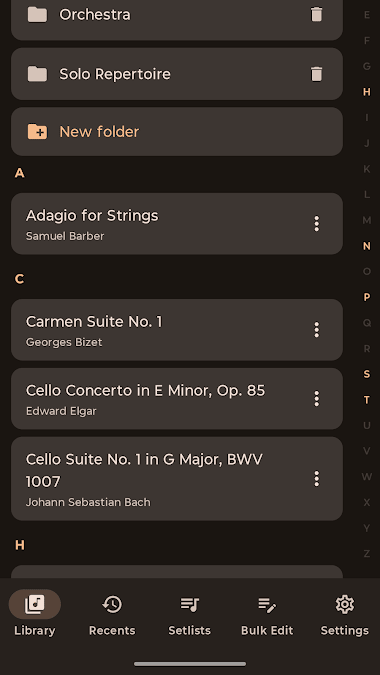
Lectern is the more interesting choice for a musician who rejected older Android readers because they felt cluttered. It combines folders and tags, supports setlists and Bluetooth page turners, includes annotation tools, and connects to Google Drive or Dropbox for backup and sync. Its reading view is deliberately quiet, and the library is easier to understand without opening a manual.
The caution is age, not concept. Lectern's Google Play listing was updated on July 6, 2026 and showed only 1,000-plus downloads and a small number of reviews when checked. A new app can be excellent, but there is less evidence about how it behaves with a 3,000-score archive, unusual pedals, years of annotations, or a long concert under pressure. Test it with copied files, keep the originals elsewhere, and do not make a new product the only home for an established library.
GoScore, previously called Setlist Gobbo, takes the budget route. The Android app is free to install with ads and in-app purchases, and it covers PDF viewing, setlists, tags, vertical or horizontal reading, scanning, and Bluetooth pedals. Its Google Play listing showed more than 50,000 downloads, giving it a longer public track record than Lectern.
GoScore's biggest compromise is annotation. Its own support page directs users to install Xodo, then opens the PDF in that separate app so the marks can be saved into the file. Backup, restore, and moving data to another device require GoScore Premium. That arrangement can work well for an occasional setlist, but it is less cohesive than drawing, organizing, and backing up inside one application.
MusicReader and Power Music make more sense on Windows
MusicReader is the simpler cross-platform answer. One account works across Windows 10 and 11, Android, iPhone and iPad, macOS, and Chromebook, with copies of the library stored in its cloud service. It supports folders, playlists, metadata, annotations, cropping, page reordering, full-page, two-page, and half-page display, automatic turns, and Bluetooth or USB pedals.
The pricing is unusually easy to understand: $15 for one year, or $10 per year when buying a three-year package. Both packages include every platform rather than charging for Android and Windows separately. MusicReader can also export original files or PDFs with annotations, which matters if the next move happens in three years rather than today.
Its advantage over MobileSheets is not a missing headline feature. It is the lower-friction idea of one account, one synchronized library, and the same familiar reading tools on several systems. Its disadvantage is that musicians who rely on deep metadata, repeat link points, custom actions, multiple specialized libraries, MIDI behavior, or highly tuned performance controls will find more room in MobileSheets. Pick MusicReader when consistency matters more than maximum configuration.
Power Music Professional deserves attention when Windows is the center of the music setup rather than a companion to a tablet. It starts at £25 and runs on Windows 8, 10, and 11. Alongside PDFs and annotations, it can import from a scanner, split and rearrange pages, maintain multiple libraries, create and share playlists, attach performance notes and audio, search by many fields, and turn pages with a keyboard, touchscreen, or foot pedal.
Power Music becomes especially distinctive for bands, churches, accompanists, and musicians working with chord sheets. Its chord editor can transpose a song or show capo chords, while the Parts feature stores different instruments or keys under one piece. A shared network database and Power Music Box are more useful to that group than a beautifully minimal tablet screen. The tradeoff is clear: this is Windows-first library software with a practical desktop character, not the closest visual imitation of forScore.
There is also a free Power Music Essentials edition for personal Windows use. It is useful for testing the basic display, playlist, chord-sheet, scanning, and pedal workflow, but Professional adds the deeper annotation, library, parts, and shared-database features that make Power Music a serious replacement. Use the free edition as a trial route, not as evidence that every feature is free.
Practis Score is for practice continuity, not stage logistics
Practis, which we make, belongs in this comparison for a specific reason. Its score view connects the page to the work done on it: practice time by page, heatmaps, bookmarks for trouble spots, notes, recordings, a movable metronome, goals, and the wider practice log. It is available on Android, iPhone, and the web, so the useful unit is not only the PDF but the history around that PDF.
That makes Practis a better fit for a student, adult learner, or teacher who wants to return to the exact page that consumed Tuesday's session and remember why. It is not the best choice for a pit orchestra player who needs an enormous metadata library, advanced setlists, external pedal mapping, MIDI triggers, and stage-tested page behavior. MobileSheets is more mature for those jobs, and saying otherwise would make this comparison less useful.
The boundary is easier to see in our forScore and Practis comparison. forScore and its closest substitutes treat a score primarily as something to organize, mark, and perform from. Practis treats it as a place where practice accumulates. A musician can reasonably use MobileSheets for a concert book and Practis for the repertoire currently being learned rather than forcing one app to do both jobs.
Use Practis when the question is
"What happened on this page during practice, and what should happen next?"
See how Practis worksA free PDF reader is enough only for a simpler job
A musician with a handful of scores may not need dedicated sheet-music software. Xodo's free PDF reader runs on Windows, macOS, and Linux, with separate Android and iOS apps. It can open, highlight, comment on, and draw directly on PDFs, and it connects to common storage services. That is enough for opening a sonata, adding fingerings, and saving the marked file.
The missing features appear as soon as the PDF becomes a performance library. Xodo does not understand a concert setlist, a half-page turn, a repeated page jump, a Bluetooth pedal as a musical control surface, or score metadata such as composer, instrumentation, and key. It is a good free PDF tool and a poor full forScore clone. GoScore can wrap more music-specific organization around it on Android, while Power Music Essentials adds a Windows-oriented library.
The table below compares the actual role of each option rather than awarding an arbitrary score. Prices are the lowest useful route shown on official pages when checked; a blank or changing in-app price is left as such instead of guessed.
| Option | Platforms here | Useful price | Best fit | Main compromise |
|---|---|---|---|---|
| MobileSheets | Android, Windows | $15.99 Android; Windows separate | Closest full replacement | Dense setup and interface |
| Lectern | Android | In-app purchases | Clean Android reading | Very new, limited track record |
| GoScore | Android | Free install; Premium extras | Simple setlists on a budget | Annotations open in Xodo |
| MusicReader | Android, Windows | $15/year or $10/year for 3 years | Simple cross-device sync | Less deep configuration |
| Power Music Pro | Windows | From £25 | Bands, chord sheets, scanning | Desktop-first character |
| Practis | Android, web | Free entry; optional Pro | Practice history on the score | Not a mature stage library |
| Xodo | Android, Windows | Free reader | Reading and marking a few PDFs | No music-specific workflow |
"Free is enough when the job is a PDF. It stops being enough when the job is a performance library."
Move one setlist before moving the whole library
A forScore library contains two kinds of material: portable documents and app-specific structure. The PDFs can move to almost any reader. forScore's metadata, setlists, settings, links, and editable annotations live partly in its private database, while its 4SB, 4SC, and 4SS formats are designed for forScore itself. A new Android or Windows app should not be expected to reconstruct that private structure automatically.
Before moving anything, create a current forScore archive. Unlike a basic 4SB backup, an archive includes the files in the Documents directory as well as the private library data. Keep that archive untouched as a rollback copy. Then export the ordinary PDFs needed for the trial setlist.
Markings require a choice. forScore can share an unmodified PDF or a permanently annotated PDF; its 4SC format keeps annotations editable but is meant for another forScore user. A flattened annotated PDF is broadly portable, but the ink is now part of the page and cannot be edited as separate layers in the new app. Keep both the clean original and the annotated export when markings matter.
Run the trial in airplane mode and with the exact pedal and stand used in rehearsal. Turn from the bottom of a dense page, jump through a repeat, switch pieces, search for an unexpected request, and restore the test library from backup. Reading scores away from the instrument can help with musical preparation, but our post on off-instrument score reading also shows why the device must disappear once attention moves into the music.
If that test succeeds and the rebuild cost is reasonable, choose MobileSheets for the most complete Android or Windows replacement. Choose Lectern for a cleaner Android experience after testing its newer backup path, MusicReader for a simpler synchronized library, or Power Music for a Windows-centered band and chord-sheet system. Use GoScore or Xodo when the job is deliberately smaller, and use Practis when the missing piece is practice memory rather than stage management.
The best replacement is not the app with the longest feature list. It is the one that can open the next score, preserve the markings that matter, turn the page on cue, and still give the library back if the device fails.


