
Best Apps for Assigning Music Homework and Practice Tasks
A practical roundup of the apps and tools music teachers use to assign homework and practice tasks - paper, shared documents, learning platforms, and dedicated practice systems - with the honest trade-offs of each.
Pract.is Editorial
Research-based practice guidance for musicians from the Pract.is editorial team.

The hardest part of music teaching is not the lesson. It is what happens between lessons. A great hour at the piano produces little durable change if the assignment that goes home is vague, scattered, or invisible. A clear, specific, actionable assignment — one the student can follow without you in the room — is what turns the lesson into a week of real practice. The right tool to deliver that assignment matters more than most teachers realise.
This article is a practical roundup of the six common ways music teachers assign homework in 2026, with the honest trade-offs of each. The Pract.is article on save time on music lesson notes and student follow-up covers the lesson-note style; this article covers the delivery layer specifically — the apps, documents, and platforms teachers actually use to get the next week's practice into the student's hands.
What a working homework system has to do
Why most assignment systems quietly fail
Most music homework gets assigned in one of two ways: a quick note written in the student's notebook at the end of the lesson, or a text or email sent later in the day. Both work in the moment and both fail by Wednesday. The notebook gets left at home, in a backpack, on the floor; the parent has not seen it, the student forgets which item was the priority. The text gets buried under newer messages; by mid-week the student is practising what they remember rather than what was assigned. Either way, the assignment that arrived at the lesson rarely survives the trip into the practice room four days later.
The second failure mode is more subtle. Even when the student remembers the assignment, the teacher cannot see what happened with it until the next lesson. Did the student attempt the hard section? Did they skip the metronome work? Did they record themselves? If the assignment and the evidence of practice live in different places — and in most teaching workflows they do — the teacher arrives at the next lesson reconstructing the week from scratch. The hour begins with "how did practice go?" instead of "let's start with the trouble spot from Tuesday."
"The assignment that arrives at the lesson rarely survives the trip into the practice room four days later. The fix is structural, not motivational."
The homework-to-practice loop
A working assignment system holds three moments together: the moment the assignment is created in the lesson, the moments during the week when the student practises it, and the moment before the next lesson when the teacher needs to know what happened. The diagram below shows the loop the right tool supports.
The homework-to-practice loop
The point of the diagram is that the assignment and the practice evidence have to live in the same system. When they do, the teacher arrives at the next lesson with context. When they do not, the teacher arrives at the next lesson with a question.
The six common ways teachers assign music homework
The rest of this article walks through the six approaches teachers actually use, what each one is good at, and where each one breaks down.
1. The student notebook
Paper notebooks are the oldest assignment system in music teaching and still the most common in private studios. The teacher writes the assignment at the end of the lesson; the student takes the notebook home and references it during the week. Strengths: zero technology friction, the parent can read it, the student physically holds the lesson record, and there is no app to learn. Weaknesses: the notebook gets left places, the handwriting is sometimes unreadable, the parent does not always check it, and there is no link to what the student actually practised.
The notebook works best for younger beginners whose parents are involved in practice setup. It works least well for adult students who would rather have a digital record, and for middle and high school students who simply do not consult notebooks reliably during the week.
2. Text and email
The second most common method is to send the assignment as a text or email later in the day, sometimes as a summary of the lesson note. Strengths: arrives in a channel the student already opens, parent can be cc'd, archive is searchable. Weaknesses: the assignment scrolls out of the visible inbox by Wednesday; there is no place for the student to track what they actually did; the teacher cannot see practice evidence; and the assignment becomes a one-off message rather than a structured weekly artifact.
Text and email work for solo adult students who manage their own practice and just need a reminder. They work less well for anyone whose practice would benefit from any kind of teacher visibility.
3. Shared documents (Google Docs, Notion, OneNote)
A growing number of teachers move the assignment into a shared document — a Google Doc per student, a Notion page, an OneNote section. The teacher updates the doc after each lesson; the student opens it during the week. Strengths: the document is persistent, searchable, and can carry history across weeks; the student has one place to look; multimedia like recordings and links can be embedded. Weaknesses: the document does not know whether the student practised; it does not surface drift or consistency patterns; it requires the student to remember to open it; and at scale (twenty-plus students), maintaining a doc per student becomes its own workload.
Shared documents are a clear upgrade over paper for adult students and for tech-comfortable families. They are not a practice tracker — they are a notes tool that happens to be digital — and they do not produce the evidence trail a teacher needs to see the week clearly.
4. Lesson notes inside a studio management platform
Studio management platforms — MyMusicStaff, Teachworks, Studio Helper — all include a lesson notes feature. The teacher writes the assignment there; the parent or student opens it in the platform. The Pract.is article on best music school management software in 2026 covers these platforms in detail. Strengths: integrates with scheduling and billing, parent visibility, central record across the year. Weaknesses: students rarely open the parent portal during practice, so the notes are read by parents more than by students; the platforms' practice-tracking modules are thin, so the assignment and the practice evidence still live in separate places.
This category is functional for schools that already use the management platform and want one less tool to add. It is not a strong choice if the goal is for the student to actually use the assignment during practice — that goal requires the assignment to live in the student's practice tool, not in the studio's office tool.
5. Learning platforms with built-in homework
Several platforms in music education are built around assignment-style learning. SmartMusic is the leading example in K-12 ensemble teaching: directors assign pieces, exercises, and sight-reading tasks; students play along with the platform's audio and submit recordings; the platform scores accuracy and reports back. Sight Reading Factory is the same model for sight-reading specifically — teachers assign sight-reading exercises at chosen difficulty levels, students complete them in the platform, and progress is tracked.
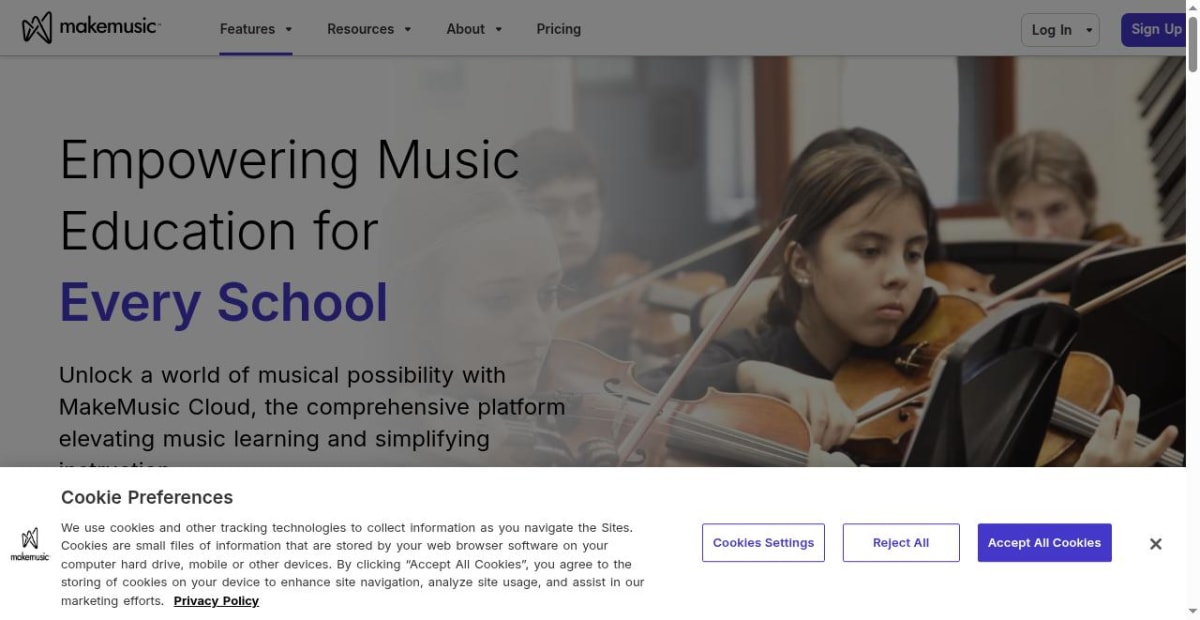
These platforms are strong for the specific use cases they cover. SmartMusic in particular is the dominant tool in many school band and orchestra programmes; for a director assigning the same exercise to forty students and needing aggregate progress data, it is hard to beat. Where they stop: the assignment is bounded by what the platform's catalogue covers. If your private studio uses repertoire outside SmartMusic's library — most adult students, most advanced classical work, anything chamber — the platform does not extend there. The assignment system has to handle the music the teacher actually teaches, not only the music the platform supports.
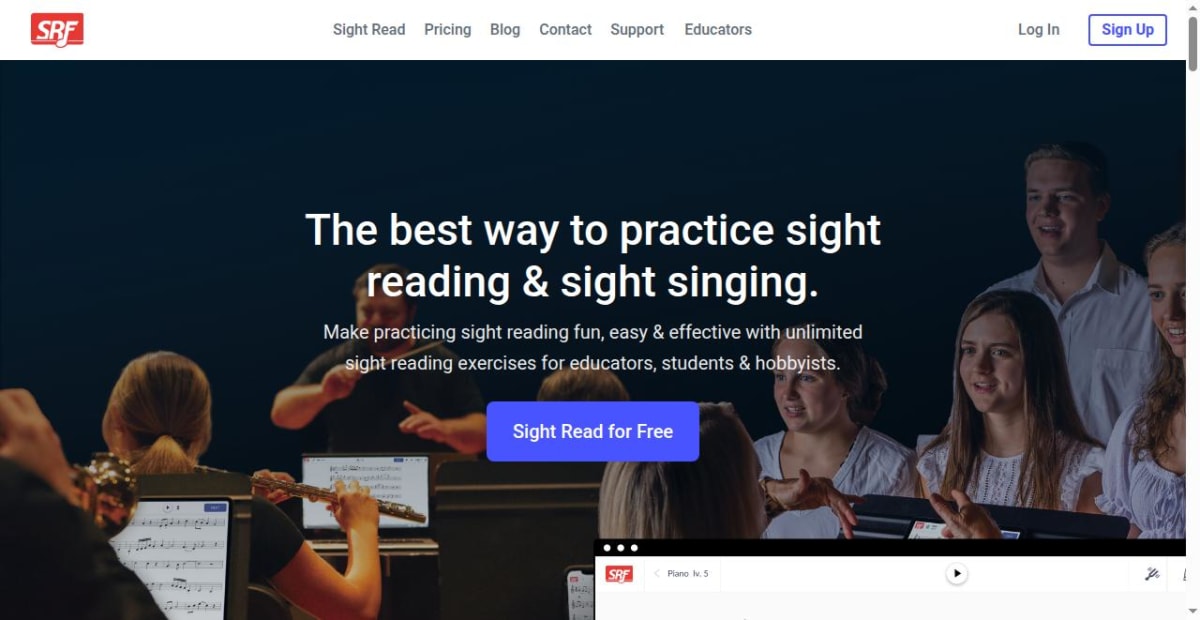
For schools and teachers whose work matches the catalogue, these platforms can sit usefully alongside a broader assignment system — SmartMusic for ensemble warm-ups and method-book work, a separate tool for everything else.
6. Dedicated practice systems with assignment built in
The most recent category is the practice-tracking tool that includes assignment as a first-class feature. Practis, Tonara, and a few others sit here. The teacher writes the assignment inside the same tool the student uses for daily practice; the student opens the practice app and sees the assignment alongside their session timer, recording space, and reflection log; the teacher sees what the student actually did against the assignment before the next lesson.
The structural difference is that the assignment and the practice evidence live in one system. The teacher's view shows not just what was assigned but what was done with it — sessions on the assigned focus area, tempo progress, recordings, reflections, skipped tasks. That is the loop the diagram earlier in this article describes, and it is the loop most other approaches do not maintain. The Pract.is article on music practice tracking for teachers covers the buying criteria for this layer specifically.
Where this approach stops: it does not handle billing, scheduling, or the operational side of the studio. That is fine; it is not trying to. A teacher running a dedicated practice system as the assignment layer should pair it with a scheduling tool and billing solution from a separate category. The Pract.is article on the music teacher software stack for private studios covers the stack composition.
Which approach fits which teaching context
When each approach fits
| Context | Best fit | Why |
|---|---|---|
| Young beginner with parental involvement | Notebook + dedicated practice system | Parent reads paper; child uses simple practice tool with prompts. |
| Adult solo student | Dedicated practice system | Adult wants digital record and self-tracked progress. |
| K-12 band, orchestra, choir | SmartMusic + Practis | Catalogue assignment + general practice oversight. |
| Private studio, mixed levels | Dedicated practice system | Handles diverse repertoire without library limits. |
| Music school, multi-teacher | Management platform notes + Practis | Operational platform handles scheduling; Practis handles teaching layer. |
| Adult sight-reading specialist work | Sight Reading Factory + Practis | Catalogue exercises + general practice context. |
Common mistakes when picking an assignment tool
A few specific patterns recur and are worth flagging.
The first is treating the assignment system and the practice system as separate problems. If they live in different places, the teacher reconstructs the week before each lesson. The Pract.is article on tracking music student progress without spreadsheets covers what reconstruction costs in real terms.
The second is picking a learning platform with a limited catalogue as the only tool. SmartMusic and Sight Reading Factory are excellent in their categories. They are not enough to be the whole assignment system for a studio with diverse repertoire.
The third is relying on the parent portal of a management platform. Parents check the portal occasionally. Students rarely open it during practice. The assignment needs to live where the student already is, which is usually the practice tool itself.
The fourth is not testing the student-facing side. The teacher's view of an assignment tool always looks good. The student-facing side often does not. Pilot with two or three students before rolling out across the studio.
The fifth is changing tools too often. Each migration costs continuity. Pick a system that can live for at least a year, and change only when something is genuinely failing.
What good assignment delivery actually looks like
Teachers who use a single integrated assignment-plus-practice system report several specific changes. The first lesson minute stops being a status update and becomes teaching. Students arrive having attempted what was assigned rather than what they remembered. Parent communication becomes evidence-tied because the assignment and the doing of it are in one record. Drift is visible mid-week instead of mid-term.
The deeper change is that the assignment becomes a real artifact of the teaching relationship rather than a sentence at the bottom of a notebook. The student opens the practice tool; the assignment is there; the practice they do feeds back to the teacher; the teacher arrives at the next lesson with context. The whole week of work has a shape — and the lesson hour gets to do its actual job rather than reconstruct the week first.
The assignment is not the small note at the end of the lesson. It is the bridge from this lesson to the next one. Pick a tool that respects that.
More on teaching.
Tonara Alternatives for Teachers and Studios After the Shutdown
Tonara alternatives for teachers and studios, compared by assignments, practice logs, recordings, messaging, admin tools, pricing, and migration friction.
Pract.is Editorial
What to Charge for Piano Lessons in 2026 (Data + a Calculator Mindset)
Set sustainable piano lesson rates for 2026 using current benchmarks, real workload, collected hours, payment fees, and a practical rate-floor formula.
Pract.is Editorial
How to Start Teaching Piano Online in 2026 (From First Student to Full Studio)
Start teaching piano online with a clear offer, first-student plan, studio policy, lesson workflow, and growth system that stays manageable.
Pract.is Editorial